
Email marketing looks simple at first. You write a message and send it to your list. But sending is only one part of the journey. What really matters is where your email lands after it is sent.
Many emails never reach the main inbox. Some go to the spam folder. Others land in tabs like Promotions or Updates. In some cases, users never even notice them. That means your message is technically delivered, but it still fails to do its job.
This is where inbox placement becomes important. It helps you understand if your emails are actually visible to your audience. If people cannot see your emails, they cannot open, read, or click them.
Today, email providers use smart filters to protect users from spam. These filters decide where each email should go. Because of this, businesses must focus not just on sending emails, but also on making sure they reach the right place.
A strong inbox placement strategy helps improve visibility, engagement, and overall results from your campaigns.
What does inbox placement mean?
Inbox placement refers to what happens after your email is delivered to a recipient’s mail server. It shows where your email finally lands inside the mailbox.
In simple words, it answers one key question:
Did your email reach the main inbox, or did it go somewhere else?
Emails can land in different places, such as:
- Primary inbox
- Promotions tab
- Spam or junk folder
- Other filtered categories
Inbox placement focuses on the best outcome — getting your email into the main inbox where users are most likely to see it and interact with it.
This is important because people usually check their main inbox first. Emails placed in spam or secondary tabs are often ignored. As a result, even a well-written email can fail if it does not appear in the right place.
Is inbox placement the same as email deliverability?
No, inbox placement and email deliverability are not the same. They are closely related, but they measure different things.
Email deliverability tells you whether your email was accepted by the recipient’s mail server.
Inbox placement tells you where that email ended up after being accepted.
Here is a simple way to understand the difference:
- Deliverability = Did the email arrive?
- Inbox placement = Did the email land in the main inbox?
An email can have high deliverability but still perform poorly. For example, your message may reach the server but end up in the spam folder. In that case, users will not see it.
That is why inbox placement gives a clearer picture of real success. It focuses on visibility, not just delivery.
How inbox placement works

Inbox placement is controlled by email providers like Gmail, Outlook, and Yahoo. These providers use advanced systems to decide where each email should go.
When you send an email, it goes through several checks before reaching the inbox. These checks include:
1. Sender reputation
Email providers track your sending history. If you send useful emails and avoid spam complaints, your reputation improves. A strong reputation increases your chances of landing in the inbox.
2. User engagement
Providers look at how people interact with your emails. They check if users:
- Open your emails
- Click links
- Reply or ignore
High engagement signals that your emails are wanted. Low engagement can push your emails into spam.
3. Email content
The content of your email also matters. Spam-like words, too many links, or poor formatting can trigger filters.
4. Authentication and setup
Technical factors like SPF, DKIM, and DMARC help prove that your email is safe and trusted.
5. Sending behavior
Sending too many emails at once or changing your schedule suddenly can raise red flags. Consistent sending patterns build trust.
All these factors work together. Based on these signals, the email provider decides whether your message goes to the inbox, promotions tab, or spam folder.
Why is inbox placement important?
Inbox placement plays a big role in the success of your email campaigns. If your emails do not reach the inbox, they lose their value.
Here are the main reasons why it matters:
1. Improves visibility
Emails in the main inbox are easy to see. Messages in spam or other tabs are often ignored. Better placement means more people notice your emails.
2. Boosts engagement
When emails land in the inbox, open rates and click rates increase. Poor placement leads to low engagement and missed opportunities.
3. Increases conversions
More visibility and engagement lead to better results. This can mean more sales, sign-ups, or user actions.
4. Protects your sender reputation
Consistently landing in spam can damage your reputation. A poor reputation makes it harder for future emails to reach the inbox.
5. Saves time and effort
Creating emails takes time. If they do not reach the inbox, that effort goes to waste. Good inbox placement ensures your work delivers real value.
6. Gives accurate performance insights
High deliverability alone can be misleading. Inbox placement helps you understand the true performance of your campaigns.
What is the inbox placement rate and how is it measured?
Inbox placement rate (IPR) is one of the most important metrics in email marketing. It shows how many of your emails actually reach the inbox instead of getting filtered into spam or other folders.
In simple terms, it answers this question:
Out of all the emails that were successfully delivered, how many were visible to users in their inbox?
Inbox placement rate focuses on visibility. It does not just measure delivery. It tells you whether your emails are likely to be seen and read.
How inbox placement rate is calculated
The calculation is simple:
Inbox Placement Rate = (Emails that reach inbox ÷ Emails delivered) × 100
For example:
- You send 10,000 emails
- 9,500 are delivered
- 8,500 land in the inbox
Your inbox placement rate would be:
(8,500 ÷ 9,500) × 100 = 89.5%
This number shows your real performance better than delivery rate. Even if your delivery rate is high, your inbox placement rate can still be low if emails go to spam.
What inbox placement rate actually measures
Inbox placement rate measures:
- Visibility of your emails
- Effectiveness of your sending practices
- How email providers treat your messages
It does not measure:
- Whether users opened your email
- Whether they clicked links
- Individual behavior
Instead, it focuses only on where your email lands.
Why measuring inbox placement is difficult
Unlike delivery rate, inbox placement is not shown in your email platform. Most email service providers only tell you if your email was accepted, not where it ended up.
To measure inbox placement, you need testing tools and special methods. These methods estimate placement based on controlled testing environments.
This means inbox placement rate is not always exact. It is a close estimate that helps you understand trends and performance over time.
Inbox placement rate benchmark
Inbox placement rates can vary by industry, email provider, and sending quality. Still, there are general benchmarks that help you understand your performance.
Here is a simple breakdown:
- 95–98% → Excellent
- 90–95% → Good
- 85–90% → Average
- 80–85% → Below average
- Below 80% → Poor
What a good benchmark means
A good inbox placement rate is usually above 90%. This means most of your emails are reaching the inbox and are likely to be seen.
If your rate drops below this level, it may signal problems such as:
- Poor sender reputation
- Low engagement
- Spam complaints
- Weak authentication setup
Benchmarks are not always the same
Inbox placement can change depending on:
- Email provider (Gmail, Outlook, Yahoo)
- Audience behavior
- Type of emails (marketing vs transactional)
You may see strong placement in one provider but weak performance in another. That is why testing across multiple providers is important.
Focus on trends, not just numbers
Instead of chasing a perfect number, focus on:
- Whether your rate is improving
- Whether it drops suddenly
- How changes affect performance
Inbox placement is best used as a trend indicator, not a one-time score.
How to test inbox placement?

Testing inbox placement is the only way to understand where your emails land. Since standard analytics do not show this data, special testing methods are required.
There are two main approaches:
- Seed list testing
- Real-user testing
Each method has its own strengths and limitations.
Seed list testing
Seed list testing is the most common method for measuring inbox placement.
In this method, you send your email to a list of test email accounts created across different providers like Gmail, Yahoo, and Outlook.
These test accounts are controlled by inbox testing tools. After sending, the tool checks where each email landed.
How seed list testing works
- You create or use a pre-built seed list
- Send your email to these test addresses
- The tool tracks placement results
- You receive a report showing:
- Inbox placement
- Spam placement
- Missing emails
This gives you a snapshot of how your email performs across providers.
Benefits of seed list testing
- Easy to use
- Quick results
- Works before sending campaigns
- Shows provider-level performance
Limitations of seed list testing
Seed testing is useful, but it has some limits:
- Test accounts do not behave like real users
- They lack real engagement history
- They may not reflect real filtering systems
Because of this, seed list testing may give overly optimistic results.
Real-user testing
Real-user testing uses actual inboxes instead of test accounts. These inboxes belong to real users or environments with real engagement history.
This method provides more accurate insights into inbox placement.
How real-user testing works
- Emails are sent to real inboxes
- These inboxes have real behavior and history
- The system tracks where emails land
- Results reflect actual user experience
Benefits of real-user testing
- More accurate results
- Reflects real engagement signals
- Captures complex filtering systems
- Works better for business environments
Real-user testing shows how your emails perform in real conditions, not controlled ones.
Limitations of real-user testing
- More complex to set up
- May cost more
- Harder to control variables
Which method should you use?
Both methods are useful:
- Use seed testing for quick checks and regular monitoring
- Use real-user testing for deeper and more accurate insights
A combination of both gives the best results.
Inbox testing tools
Inbox testing tools help you measure and improve inbox placement. They show where your emails land and highlight issues that affect performance.
Here are three popular tools used by marketers today:
Everest by Validity

Everest is a powerful inbox placement and deliverability platform.
It provides detailed insights into how your emails perform across different mailbox providers. It uses a large global seed network to test inbox placement and give accurate reports.
Key features
- Large seed list network across many providers
- Inbox vs spam placement tracking
- Sender reputation monitoring
- Performance analytics and reporting
Why it is useful
Everest helps you understand where problems occur. It allows you to fix issues before they affect your campaigns. It is widely used by teams that send high volumes of emails.
Litmus
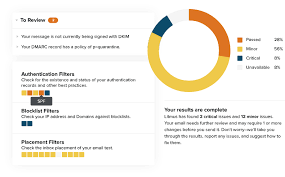
Litmus is a well-known email testing platform. It focuses on both email design and deliverability.
It includes inbox placement testing features that show where your emails land across different providers.
Key features
- Inbox placement previews
- Email rendering across devices
- Spam filter testing
- Performance tracking
Why it is useful
Litmus is helpful for teams that want both design testing and deliverability insights in one place. It ensures your emails not only reach the inbox but also look good when opened.
Allegrow

Allegrow is a newer tool focused on accurate inbox placement testing, especially for business emails.
It stands out by using real inbox environments instead of relying only on seed lists.
Key features
- Real inbox testing
- Advanced risk detection
- Continuous monitoring
- Focus on business email environments
Why it is useful
Allegrow provides more realistic results. It helps teams understand true inbox performance and avoid false confidence from basic testing methods.
How to increase inbox delivery rate: best practices

Improving inbox placement is not about one quick fix. It requires steady effort and smart practices over time. Email providers look at many signals before deciding where your emails should land.
If you follow the right steps, you can build trust and improve your chances of reaching the inbox consistently.
Below are the most effective and up-to-date best practices you should follow.
Diligently oversee your email list (5)
Your email list is the foundation of your deliverability. A clean and healthy list helps you reach real people who want to hear from you.
Start by removing invalid or inactive email addresses. These addresses can cause hard bounces, which harm your sender reputation. High bounce rates signal poor list quality to email providers.
Next, focus on inactive subscribers. If someone has not opened your emails for a long time, they may no longer be interested. Keeping them on your list lowers your engagement rate. You can run re-engagement campaigns or remove them if they stay inactive.
Avoid buying or renting email lists. These lists often contain outdated or low-quality contacts. Sending emails to such lists increases spam complaints and damages your reputation quickly.
Also, use double opt-in whenever possible. This ensures that users truly want to receive your emails. It adds an extra layer of trust and reduces fake sign-ups.
A well-managed email list leads to better engagement, fewer complaints, and stronger inbox placement.
Use email authentication (5)
Email authentication helps prove that your emails are real and safe. It tells email providers that your messages come from a trusted source.
There are three main authentication methods:
- SPF (Sender Policy Framework)
- DKIM (DomainKeys Identified Mail)
- DMARC (Domain-based Message Authentication, Reporting, and Conformance)
SPF checks if the sending server is allowed to send emails on behalf of your domain. DKIM adds a digital signature to your emails to ensure they are not altered. DMARC builds on both and provides rules for handling suspicious emails.
When these methods are set up correctly, they reduce the risk of spoofing and phishing. Email providers trust authenticated senders more, which improves inbox placement.
Without proper authentication, your emails are more likely to be flagged as spam or rejected.
Setting up authentication may require technical help, but it is one of the most important steps for long-term success.
Make sure your emails are compliant with legal regulations (5)
Email laws exist to protect users from unwanted messages. Following these rules is not just about avoiding penalties. It also helps build trust with both users and email providers.
Some common requirements include:
- Getting clear permission before sending emails
- Including an unsubscribe link in every email
- Showing your business name and contact details
- Honoring unsubscribe requests quickly
Different regions have different laws, such as GDPR in Europe or CAN-SPAM in the United States. Even if your business operates locally, your subscribers may come from different regions.
Sending emails without permission or ignoring unsubscribe requests can lead to spam complaints. These complaints directly affect your inbox placement.
When your emails follow legal standards, users trust your brand more. Email providers also see you as a responsible sender, which improves your chances of reaching the inbox.
Maintain the engagement high (4)
User engagement is one of the strongest signals for inbox placement. Email providers track how people interact with your emails.
They look at actions such as:
- Opens
- Clicks
- Replies
- Deletes without reading
If users engage with your emails often, it shows that your content is valuable. This increases your chances of landing in the inbox.
To keep engagement high, focus on relevance. Send emails that match your audience’s interests. Segment your list based on behavior, location, or preferences.
Personalization also helps. Use names, past actions, or preferences to make emails feel more relevant.
Timing matters too. Send emails when your audience is most active. Test different days and times to find what works best.
Avoid sending too many emails. Too many messages can annoy users and lead to unsubscribes or spam complaints.
High engagement builds trust and keeps your emails visible in the inbox.
Robert Brandl
Email expert Robert Brandl has often highlighted the importance of quality over quantity in email marketing.
His insights focus on sending emails that people actually want to receive. Instead of chasing large lists, he emphasizes building smaller, more engaged audiences.
He also stresses the need for clear expectations. When users sign up, they should know what kind of emails they will get and how often. This reduces surprises and keeps engagement steady.
Another key idea is consistency. Sending emails regularly helps build familiarity and trust. Sudden changes in frequency can confuse users and trigger spam filters.
Following expert advice like this helps you create a strong foundation for better inbox placement.
Check emails on “Spam” (4)
It is important to test where your emails land before sending them to your full list. Sometimes, even well-designed emails can end up in spam.
You should regularly check your emails across different providers like Gmail, Yahoo, and Outlook. Send test emails and see if they land in the inbox or spam folder.
If your emails go to spam, look for possible issues such as:
- Spam-like subject lines
- Too many links or images
- Missing authentication
- Poor formatting
Also, check your domain and IP reputation using available tools. A poor reputation increases the chances of spam placement.
Testing helps you catch problems early. Fixing them before sending large campaigns can save your reputation and improve results.
Keep the sending volume and schedule consistent (3)
Consistency is key in email sending. Email providers track your sending patterns closely.
If you suddenly send a large number of emails after being inactive, it can look suspicious. This may trigger spam filters.
Instead, build your sending volume gradually. This process is known as “warming up” your domain or IP. It helps email providers get used to your sending behavior.
Maintain a regular schedule as well. For example, if you send emails every week, try to stick to that pattern. Sudden changes can confuse both users and filters.
Consistency builds trust over time. It shows that you are a reliable sender, which improves your inbox placement.
Audit email deliverability rate regularly (2)
Regular audits help you understand how your emails are performing. Without tracking, it is hard to know what is working and what needs improvement.
Monitor key metrics such as:
- Delivery rate
- Inbox placement rate
- Bounce rate
- Spam complaints
- Open and click rates
Use inbox testing tools to check placement across different providers. Look for patterns or sudden drops in performance.
If you notice issues, take action quickly. For example, clean your list, adjust your content, or fix technical settings.
Regular audits help you stay proactive. Instead of waiting for problems to grow, you can fix them early and maintain strong inbox performance.
Final Thought
Inbox placement is one of the most important parts of email marketing, yet many beginners overlook it. Sending an email is only the first step. What truly matters is whether your message reaches the inbox and gets noticed.
A strong inbox placement strategy requires attention to detail. You need a clean email list, proper authentication, and content that users find helpful. You must also follow legal rules and maintain steady engagement over time.
There is no single trick that guarantees success. Instead, success comes from combining multiple best practices and applying them consistently. Small improvements in each area can lead to big results over time.
Testing and monitoring also play a key role. When you track your performance and adjust your strategy, you stay ahead of potential problems. This helps protect your sender reputation and keeps your emails visible.
Inbox placement is about trust. When email providers trust you, your emails reach the inbox. And when users trust you, they open, read, and act on your messages.
Read More: Email List Cleaning: Personal Insights On Ensuring High Email Deliverability