Email marketing is not new. But email automation has changed the game. In 2026, brands are not just sending emails. They are sending the right message at the right time without manual work.
Customers expect fast responses and personal experiences. They do not want random promotions. They want helpful emails that match their behavior. That is where automation makes a big difference.
Automated emails help businesses stay connected with leads and customers 24/7. They guide people from first contact to final purchase. They also bring back inactive users and increase repeat sales.
When done right, automation feels personal. It builds trust. It improves engagement. Most importantly, it increases revenue without increasing workload.
In this guide, you will learn what automated emails are and how they work. Then, you will explore real-world examples that show how brands use automation to drive sales.
What Are Automated Emails?
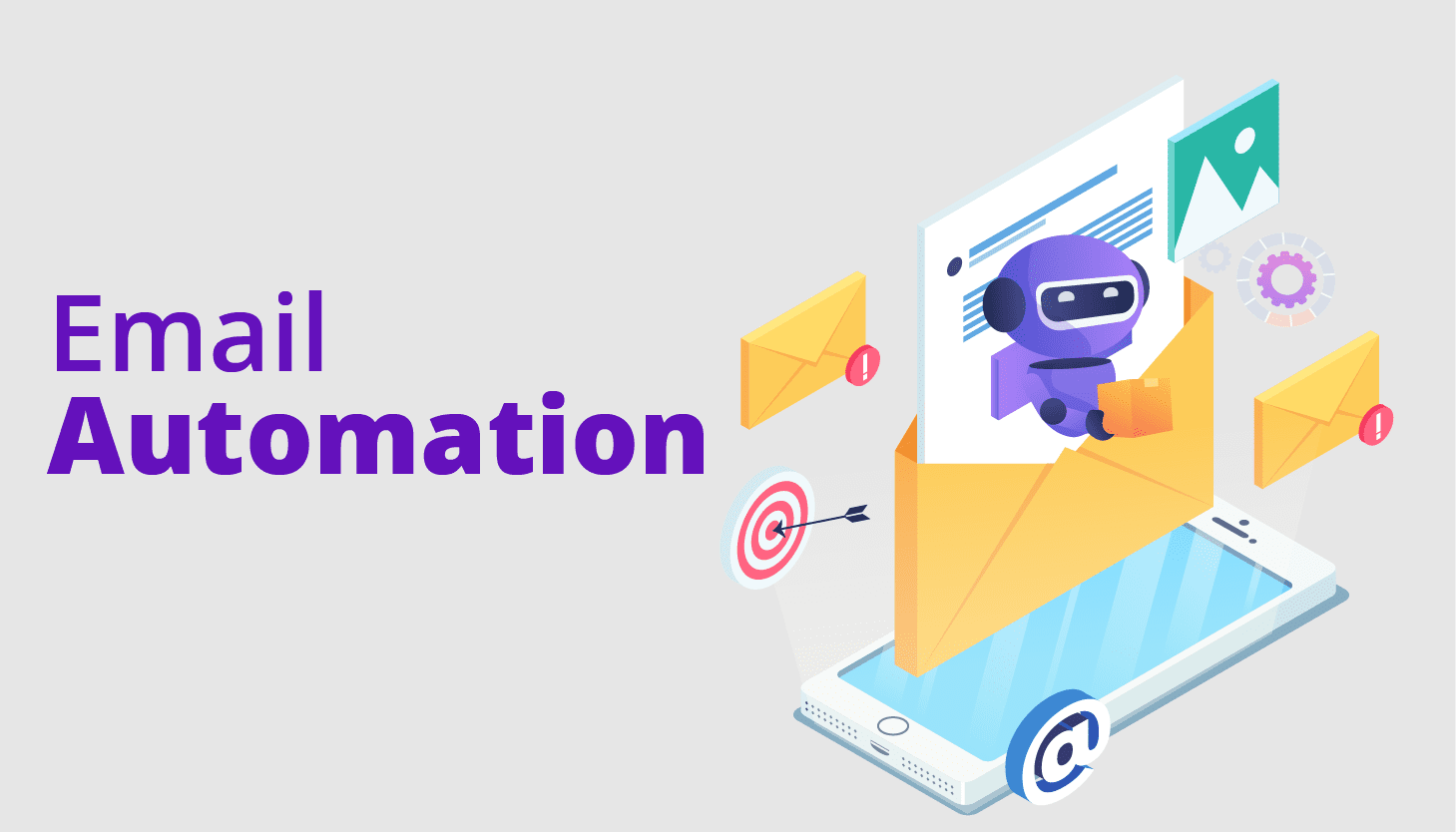
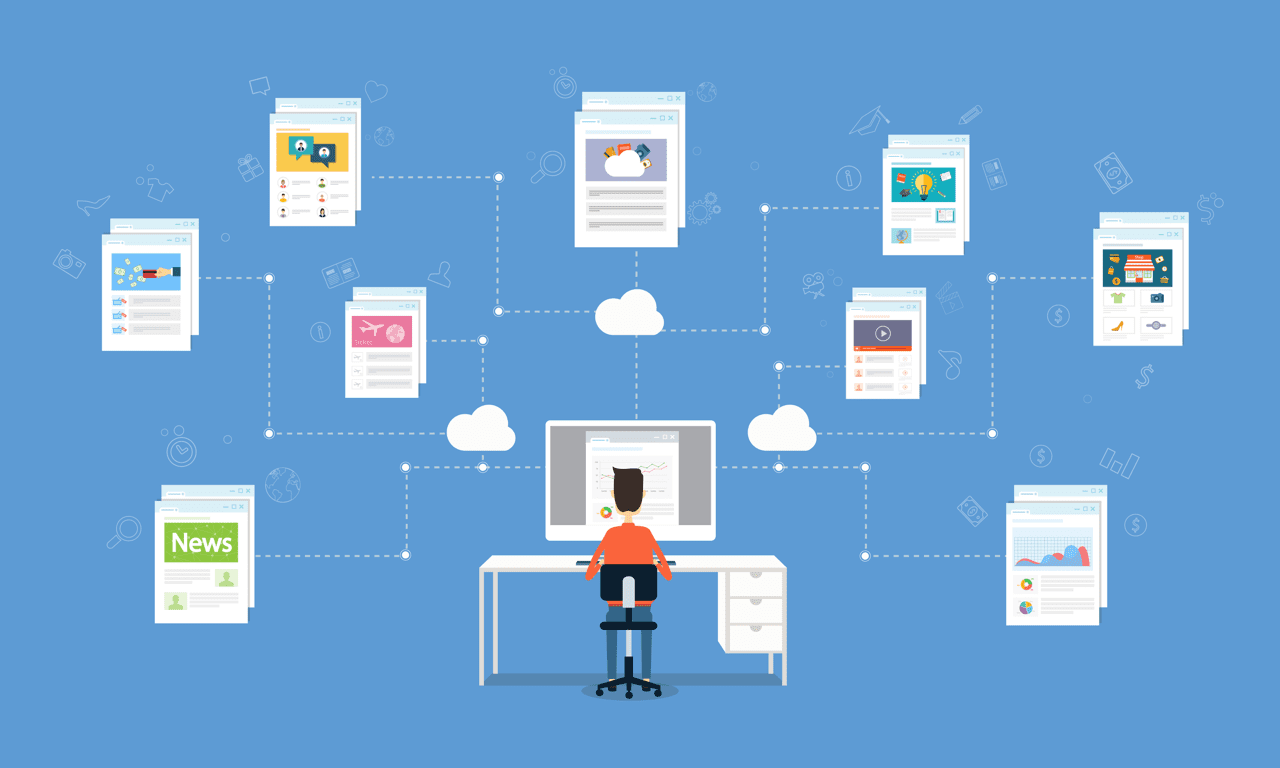
Automated emails are messages that are sent automatically based on user actions, behavior, or set rules. They are not sent manually one by one. Instead, they are triggered by specific events.
For example, when someone signs up for a newsletter, they may receive a welcome email instantly. If a shopper adds a product to the cart but does not complete the purchase, they may receive a reminder email later. These messages are automated.
Automation works through triggers and workflows. A trigger can be:
-
Signing up for an account
-
Downloading a guide
-
Making a purchase
-
Leaving items in a cart
-
Not opening emails for a long time
Once the trigger happens, the system sends a pre-written email or a series of emails.
Automated emails can be personalized. They can include the customer’s name, product preferences, and past purchases. This makes the message more relevant and more likely to convert.
In simple terms, automated emails help businesses send smart, timely, and targeted messages without doing everything manually. That is why they are one of the most powerful tools for increasing sales in 2026.
What Are The Benefits Of Email Marketing Automation?
Email marketing automation helps businesses work smarter. It saves time. It also increases sales without adding extra pressure on your team.
Here are the main benefits you should know.
1. Saves Time and Effort
Automation handles repetitive tasks. You do not need to send emails one by one. Once you set up a workflow, it runs on its own.
This allows you to focus on strategy, content, and growth instead of manual work.
2. Sends Emails at the Right Time
Timing matters in marketing. Automated emails are triggered by user actions.
If someone signs up, they get a welcome email instantly. If they leave items in their cart, they receive a reminder at the right moment.
This improves open rates and increases conversions.
3. Improves Personalization
Automation tools collect data such as names, interests, and past purchases.
You can use this data to send personalized messages. Emails can include product suggestions based on browsing history. They can recommend items related to past orders.
Personal emails feel more relevant. Relevant emails drive more sales.
4. Increases Customer Engagement
Regular and targeted communication keeps your brand fresh in the customer’s mind.
Welcome emails, onboarding series, and follow-ups guide users step by step. This builds stronger relationships.
Engaged customers are more likely to buy again.
5. Boosts Sales and Conversions
Automated campaigns like cart abandonment emails and product recommendations directly target buying behavior.
These emails remind customers to complete purchases. They also suggest products they may like.
As a result, your revenue increases without extra advertising costs.
6. Helps Nurture Leads
Not every visitor is ready to buy. Automation allows you to educate and nurture leads over time.
You can send helpful content, tips, and product benefits in a structured sequence.
This builds trust and moves prospects closer to a purchase decision.
7. Provides Better Data and Insights
Automation platforms track open rates, clicks, and conversions.
You can see what works and what does not. Then you can adjust your strategy based on real data.
In simple words, email marketing automation helps you stay consistent, personal, and strategic. It reduces manual work while increasing results. That is why it remains a powerful sales tool in 2026.
10 Email Automation Examples and Strategies
1. Supergoop’s Welcome Email Example
A welcome email is one of the most important first touches you send to new subscribers or customers. It’s the first chance to show your brand’s personality, set expectations, and begin building a long-term relationship. In fact, welcome emails tend to have much higher open and click-through rates than regular newsletters or promotional campaigns because they arrive right after someone expresses interest. This makes them incredibly valuable for turning simple sign-ups into engaged customers early in their journey.
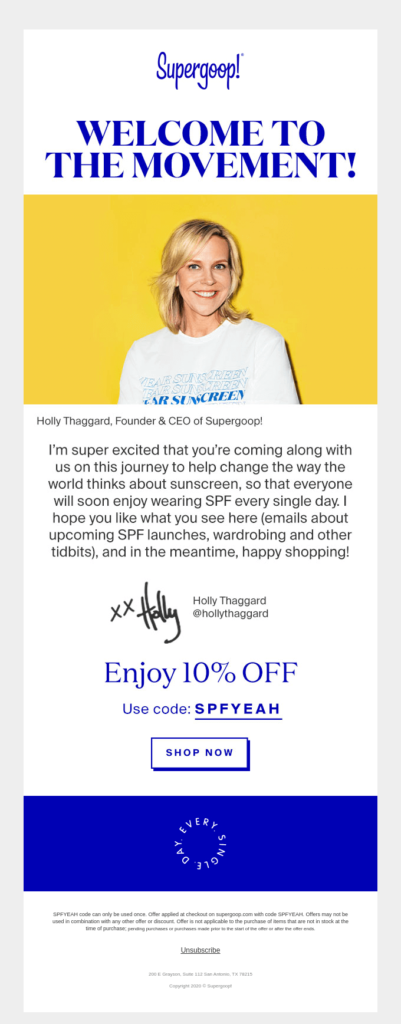
Supergoop’s approach to welcome emails focuses on making new subscribers feel appreciated and informed. When someone signs up, Supergoop immediately sends a welcome email that does several key things:
-
Warm greeting: The email starts with a friendly welcome that thanks the subscriber for joining. This helps build goodwill from the first interaction without pushing for a sale too quickly.
-
Brand introduction: It provides a quick overview of who the brand is and what it stands for. In Supergoop’s case, that means highlighting its focus on clean and effective sunscreen and skin care solutions — essential information that helps subscribers understand the brand’s mission and value.
-
Useful content: Instead of just saying “hello,” the email explains how to get started, what to expect from future emails, and where to find helpful resources like product guides or key categories on the website.
-
Clear call-to-action (CTA): The primary CTA might lead readers to shop bestsellers, learn about the science behind their products, or explore popular sunscreen picks. This gentle nudge encourages engagement without feeling pushy.
Successful welcome emails like Supergoop’s are not just introductions — they’re strategic tools to move users closer to a first purchase by building trust, interest, and clarity right away. Sending this email immediately after sign-up is critical. It uses the high engagement window when a person is still excited about your brand and more likely to open and act on the message.
Now let’s see an interesting welcome email example made by Supergoop, a sunscreen company:
Subject line: Welcome to the Bright Side
2. Grammarly’s Onboarding Email Series
A welcome email is just the beginning. To truly guide a new subscriber or user toward becoming a loyal customer, onboarding email series are essential. These are multi-step campaigns sent over days or weeks that help users get value from your product or service early on. They are especially useful for tools or platforms with features that benefit from explanation and demonstration.
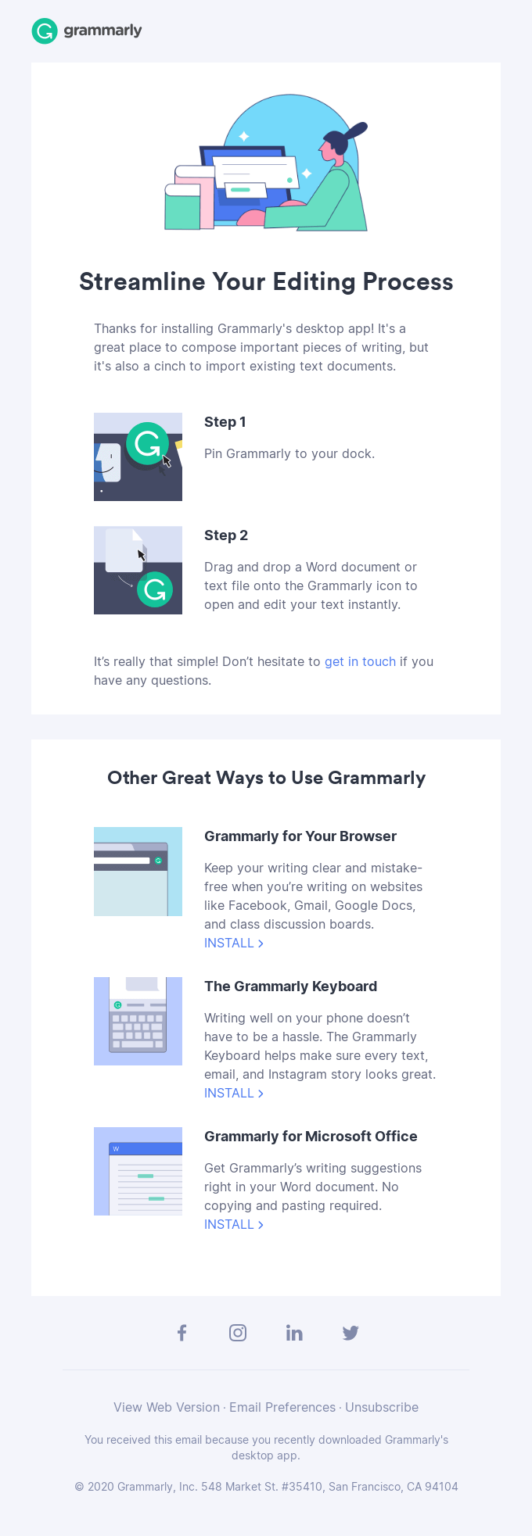
Grammarly’s onboarding email series is a strong example of how to use automation for education and engagement. The sequence goes beyond a simple welcome by gradually introducing users to what the product can do and how they can get the most out of it:
-
Step-by-step guidance: The first onboarding email typically shows new users how to begin using the tool — for example, installing the desktop app or browser extension and integrating it with everyday writing tools. This helps remove confusion and ensures users don’t get stuck at the first hurdle.
-
Feature highlights: Instead of overwhelming people with everything at once, each email focuses on one feature or benefit. For instance, one message might explain advanced grammar corrections, while another shows how to use vocabulary enhancements or tone suggestions.
-
Practical tips: The emails do not just list features — they illustrate how to apply them in real life. For example, showing how Grammarly can improve a school essay or a work email makes the value clear and relevant.
-
Encouraging interaction: Later emails invite users to explore additional tools like the mobile keyboard, integrations with email platforms, or even social media buttons to stay connected. This keeps engagement consistent without crowding inboxes.
-
Balanced frequency: The sequence is paced so users do not feel overwhelmed. Instead of flooding users with multiple emails at once, the campaign maintains a steady flow with purposeful pauses that respect user attention and avoid fatigue.
Onboarding series like Grammarly’s help convert subscribers into active users by meeting them where they are in the journey. They educate, guide, and build confidence over time — which increases the likelihood of retention, usage, and eventual purchases.
Let’s see a relevant email automation example by Grammarly:
Subject line: Pro tip for using Grammarly’s desktop app
3. Paddywax Transactional Email Campaign
Not all automated emails are about selling directly. Some are purely informational but still play a significant role in nurturing customer relationships and driving future revenue. These are called transactional emails. They are triggered by specific user actions rather than promotional schedules, and they often have extremely high open rates because customers expect and rely on them for important details.
Paddywax’s transactional email campaign offers a prime example of how brands can use this type of automation to improve customer experience and reinforce trust.
Transactional emails are typically triggered by events such as:
-
Order confirmation
-
Shipping notifications
-
Account creation or password resets
-
Subscription confirmations
Here’s how Paddywax leverages this automation:
-
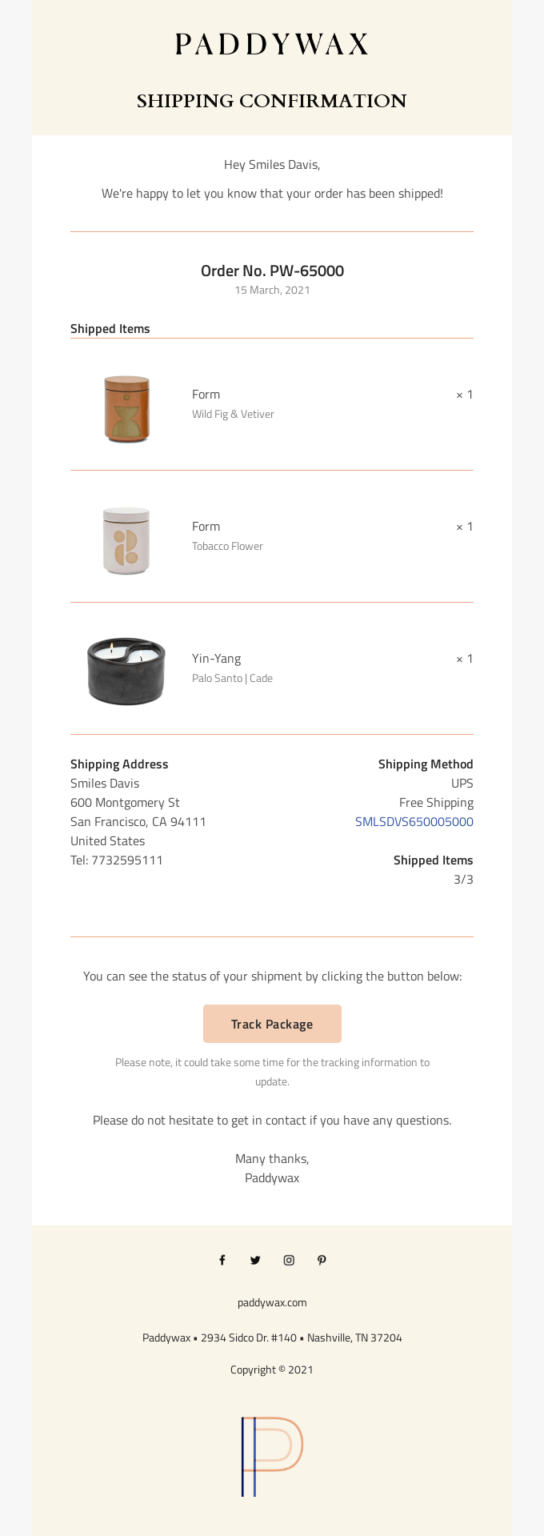
Order confirmation emails: As soon as a customer completes a purchase, an automatic email is sent confirming the order. This email includes vital details such as the order number, purchase summary, billing information, and next steps like expected shipping timelines. It reassures customers that their order is successful and lets them know what to expect.
-
Shipping updates: Another type of transactional email informs the customer when the item has shipped and provides tracking information. These updates reduce anxiety and give customers confidence in the transaction process.
-
Helpful post-purchase notes: These messages often include care tips, recommendations for related products, or invitations to follow social accounts. This not only improves customer experience but also encourages future engagement.
-
High engagement opportunity: Because transactional emails are expected and often opened immediately, they provide an excellent platform for subtle revenue strategies. Including personalized recommendations or loyalty incentives in these emails can boost cross-selling without risking irritation because the primary purpose remains informative and service-oriented.
Paddywax’s transactional campaign shows how automated emails triggered by customer actions can support a seamless experience while creating opportunities for future sales. Used strategically, transactional emails become more than just confirmations — they reinforce trust, improve satisfaction, and subtly motivate customers to return.
Let’s see this shipping confirmation email by Paddywax:
Subject line: A shipment from order PW-65000 is on the way
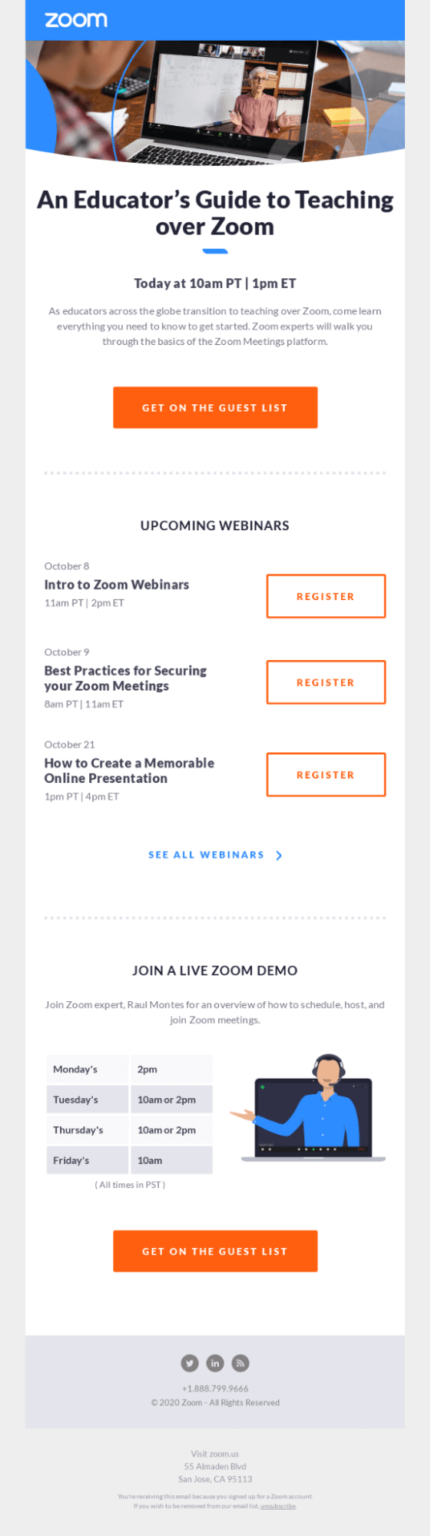
4. Zoom’s Lead Nurturing Campaign
A lead nurturing campaign helps brands stay connected with potential customers who are not yet ready to buy. Not every visitor makes a purchase on their first visit. Most people need time, information, and encouragement before they decide. That is where lead nurturing automation plays a powerful role.
Zoom uses lead nurturing emails to guide new and potential users through their journey from interest to conversion. Their strategy focuses on educating, building trust, and encouraging engagement with the product. When someone signs up or expresses interest, Zoom does not suddenly send a hard sell. Instead, they send a series of automated messages designed to inform and inspire.
First, they welcome and educate.
The first lead nurturing email usually thanks the user for signing up or showing interest. It highlights how Zoom works and what makes it valuable. For example, it may show the ease of starting or scheduling meetings. It may also explain features such as screen sharing, virtual backgrounds, or recording capabilities.
Then, they send helpful tutorials and tips.
Later in the series, Zoom sends emails that explain specific features more deeply. These emails often include short tutorials, videos, or links to knowledge base articles. The goal is to help users understand how to use Zoom effectively — whether for remote work, online classes, or team meetings.
This step is crucial because people often lose interest when they do not know what to do next. By breaking the learning process into small steps, Zoom keeps users engaged and reduces frustration.
Next, they showcase use cases.
Zoom’s nurturing emails also show real-world examples of how others use the product. For instance, they may highlight how educators run virtual classrooms or how teams collaborate daily through Zoom. These stories help subscribers see themselves using the product in their own lives.
They send reminders at strategic points.
If a user signs up but does not start a meeting or fails to explore the platform further, Zoom’s automation can trigger reminder emails that encourage the next step. These messages are personalized based on user behavior. If someone has not used a specific feature, the email may suggest trying it.
Lastly, they gradually bring offers and upgrades into the flow.
Once users are more comfortable with the basics and have used Zoom more frequently, automated emails may shift toward conversion. This includes invitations to try premium plans, feature highlights only available in paid tiers, or limited-time offers. Because users have already seen value, these messages are more likely to convert.
Zoom’s lead nurturing campaign works because it focuses on the user experience rather than forceful selling. It builds trust, educates step by step, and aligns messaging with user actions — which boosts engagement and conversions over time.
Let’s explore this campaign format by Zoom:
5. Skillshare’s Re-Engagement Email
Over time, some subscribers become inactive. They may sign up, open a few emails, then fall silent. They stop clicking links, stop browsing, and stop buying. Re-engagement campaigns target these users with automated emails designed to bring them back into the fold.
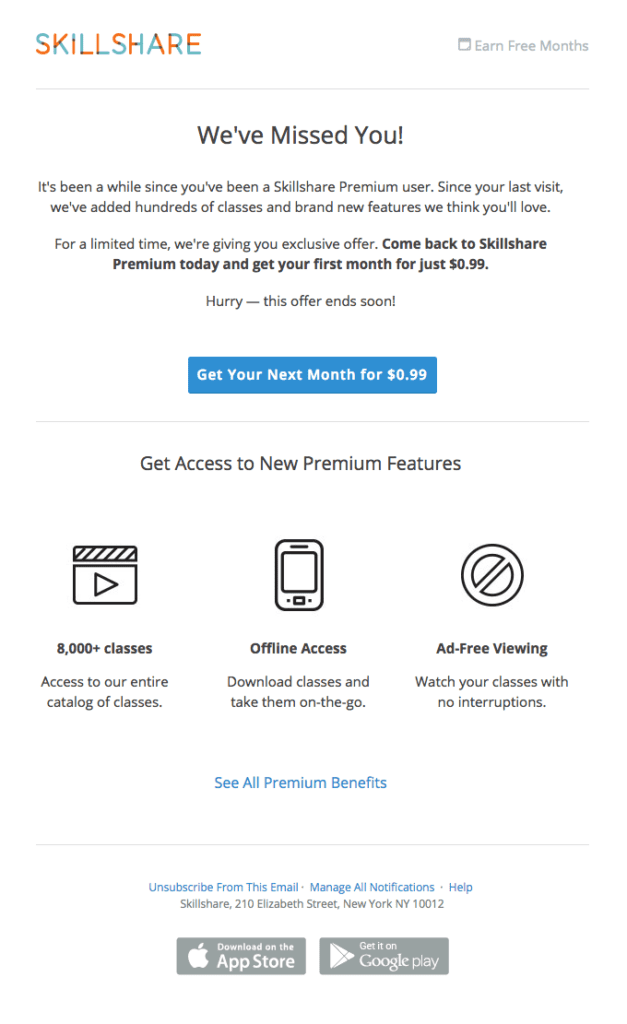
Skillshare uses re-engagement automation to win back subscribers who have lost interest. Their emails are crafted not just to remind people they exist, but to show renewed value, spark curiosity, and offer incentives to return.
The first step is gentle reminders.
The initial re-engagement email is usually friendly and upbeat. It may acknowledge that the subscriber hasn’t opened recent emails or logged into the platform recently. Instead of scolding or guilt-tripping, it emphasizes what the subscriber is missing — such as exciting new classes or updated features.
These messages focus on benefit and curiosity. For example, a subject line might mention “Top new classes you might love” or “Skills trending right now.” This taps into the subscriber’s original motivation for joining and reminds them of the value they once found.
Personalized suggestions are key.
Skillshare’s automated emails often include recommendations based on past interests. If a subscriber previously engaged with design classes, the email may highlight new design content. This tailored approach feels thoughtful rather than generic. It increases the chance that the user will click and re-engage.
Incentives help reignite action.
In many re-engagement emails, Skillshare adds incentives such as free trials, discounts, or exclusive access. For example, they may offer a limited-time free month or extra credits toward premium content. These offers give subscribers a reason to act now instead of ignoring the message again.
Automated follow-ups increase impact.
If the subscriber still does not respond, the automation triggers follow-up emails. These may use different angles — urgency, exclusivity, or fresh content highlights. By spacing these messages over days or weeks, Skillshare keeps trying without overwhelming the inbox.
Last-chance messages help clean the list.
Eventually, some subscribers will still not respond. Skillshare may send “last chance” or “we’ll miss you” emails that inform inactive users they will be removed from the list if they do not engage. This helps improve list quality over time, ensuring the audience stays relevant and engaged.
Skillshare’s re-engagement automation boosts activity by reminding users of value, personalizing content, and offering incentives. It turns dormant contacts into active learners and reduces churn of subscribers.
Here’s how Skillshare approached this:
Subject line: Come See What’s New!
6. AWAY’s Cart Abandonment Email
Cart abandonment is one of the most common challenges online stores face. Many shoppers add items to their cart but leave the site without completing the purchase. If these visitors could be reminded at the right time, many will return and finish the checkout. That’s where cart abandonment automation helps.
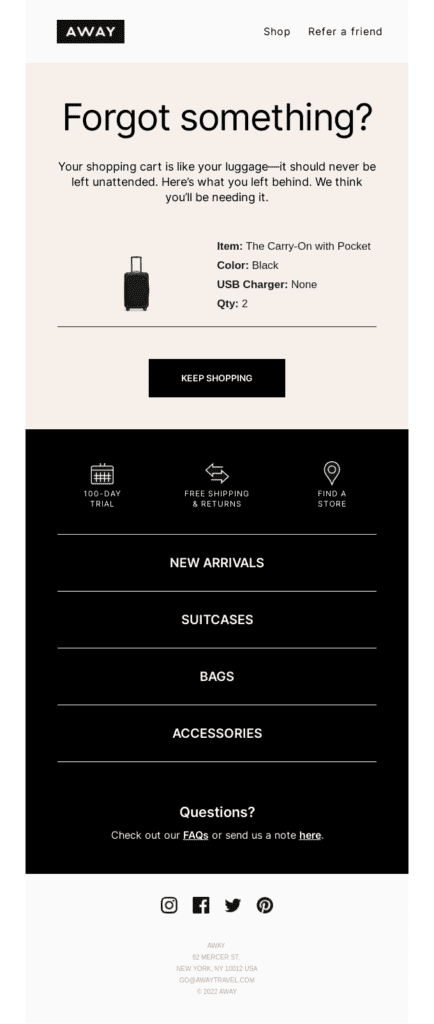
AWAY, a travel bag and accessories brand, uses automated cart abandonment emails to recover lost sales and boost revenue. Their emails are triggered when a shopper leaves items in the cart for a set time without completing payment.
The first abandoned cart email arrives soon after exit.
This email reminds the shopper of what they left behind. It typically includes images of the exact products, the price, and a clear call-to-action button that brings them back to the checkout page. The tone is helpful and friendly — not pushy. The idea is to remind, not irritate.
Adding urgency and benefits increases conversions.
A follow-up email may introduce urgency. For example, it might mention that stock is limited or the cart will expire soon. Urgency works well because many shoppers intend to buy but forget or delay. A gentle nudge often motivates action.
Incentives can be added in later emails.
If the first reminder does not work, AWAY’s automated sequence may include a second email with incentives such as free shipping, a small discount, or a bonus gift. This email appears only if the shopper still hasn’t returned. The incentive gives them tangible reasons to come back and complete the purchase.
Helpful support information can improve experience.
These emails sometimes include links to customer service or product guides. For example, information about shipping timelines, return policies, or product reviews can reduce hesitation and increase trust.
Automated reminders are spaced strategically.
AWAY’s cart abandonment sequence does not send all emails at once. Instead, it sends the first reminder soon after abandonment, a secondary message after a few hours, and a final incentive offer after a day or two. This timing balances effectiveness and inbox etiquette.
Cart abandonment automation works because it reaches customers exactly when they are most likely to convert. AWAY’s smart use of reminders, urgency, and incentives helps recover sales that would otherwise be lost. When done right, cart abandonment emails alone can have a significant impact on revenue growth — making them a key strategy for 2026 email automation success.
Let’s have a look at this abandoned cart email made by AWAY:
Subject line: Did you forget something?
7. Good Eggs Product Recommendation Campaign
Product recommendation emails are one of the most powerful tools in email automation. They use data from customer behavior to send highly relevant suggestions that feel personal. When done right, these emails increase sales and improve customer satisfaction because they connect shoppers with items they genuinely want.
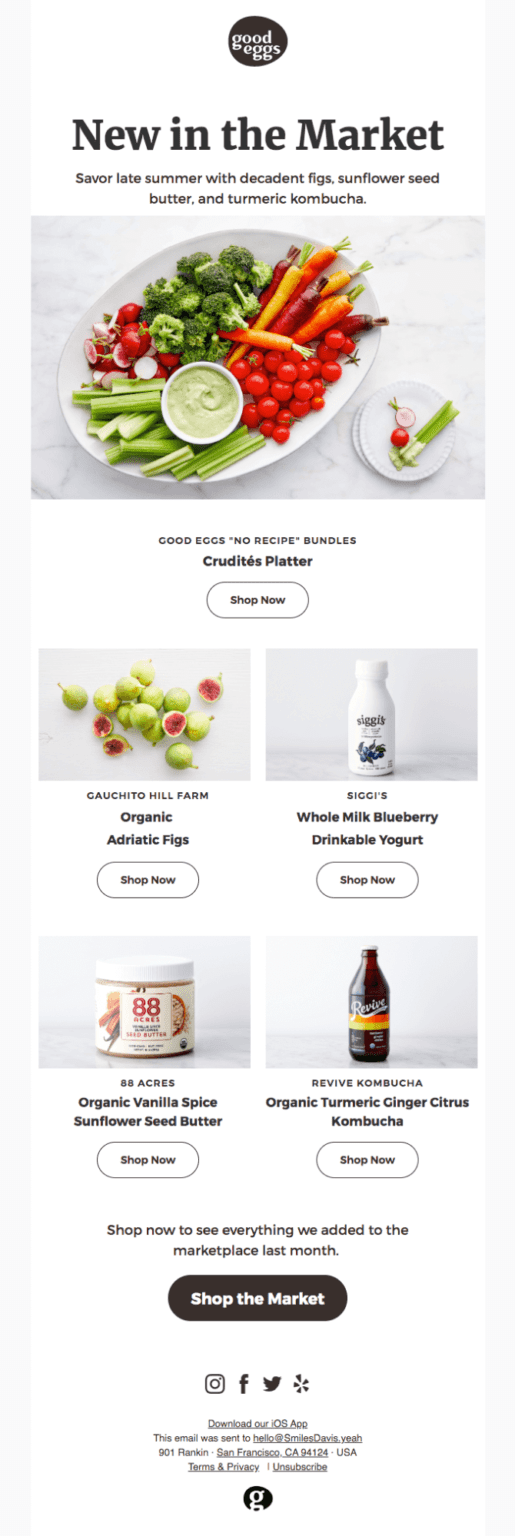
Good Eggs uses product recommendation automation to inspire repeat purchases and cross-sell in a gentle, helpful way. Instead of blasting generic promotions, this strategy shows subscribers products that match their past interests and buying habits.
How the automation works
When someone shops on Good Eggs, the system collects data like what they viewed, added to cart, or purchased. This information feeds into automated workflows that trigger recommendation emails. These emails then include products tailored to each customer’s preferences.
For example, if a subscriber frequently buys organic produce, the email might highlight seasonal organic fruits or vegetables they haven’t tried yet. If another customer bought artisanal cheese, the automation may recommend complementary items like crackers, charcuterie boards, or specialty wines.
The role of personalization
Personalization goes beyond simply inserting the customer’s name. Good Eggs leverages detailed data points such as purchase history, browsing behavior, and category interests. The system then dynamically includes products that match those signals. This level of personalization makes the content feel thoughtful and relevant, rather than random.
Personalized product recommendations create a sense of discovery. Instead of asking customers to search for what they want, the emails bring suggestions directly to their inbox. This reduces friction and increases the chances of a purchase.
Timing and triggers matter
Good Eggs’s automated product recommendation campaign often triggers at strategic moments:
-
After a purchase: Soon after a customer completes an order, they receive suggestions for items that complement their recent purchase. For example, if the order included pasta, the email might recommend a fresh sauce or gourmet olive oil.
-
Based on browsing activity: If a subscriber looks at specific products but doesn’t buy them, the automation can send recommendations that include those same items or similar alternatives.
-
Weekly updates: Some campaigns aggregate top picks based on individual preferences and send them in a weekly digest. This keeps customers engaged with fresh ideas and helps drive regular traffic back to the store.
Benefits of this strategy
Good Eggs’s product recommendation emails succeed because they feel tailored, timely, and helpful. Shoppers feel understood rather than marketed to. This builds trust, making them more likely to open future messages and click through.
These campaigns also increase average order value. Customers often add recommended items to their carts, boosting revenue without needing new customer acquisition. With automation handling the segmentation and email triggers, the system scales effortlessly across a large audience.
For example, let’s see this campaign by Good Eggs:
Subject line: Check out our late summer picks – see what’s new at Good Eggs
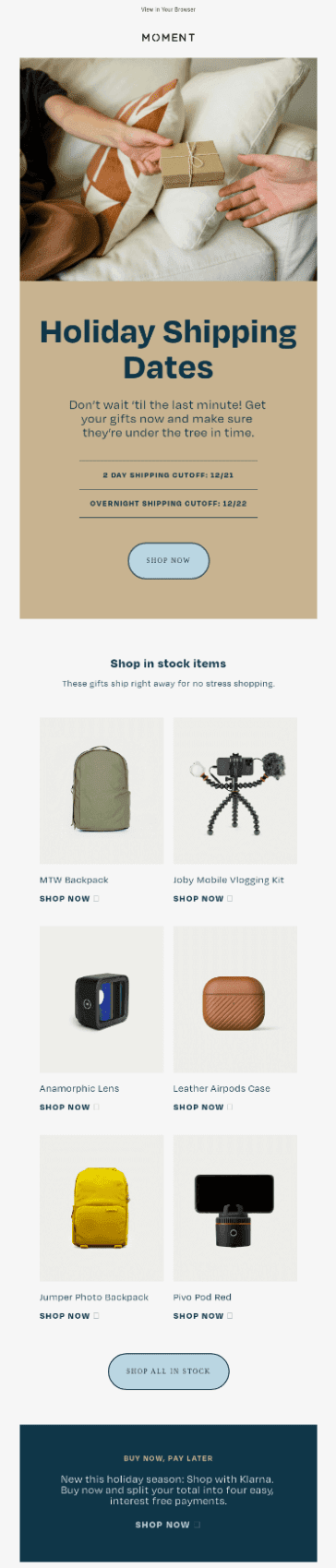
8. Moment’s Seasonal Email
Seasonal email campaigns are another strong automation strategy. These emails align with holidays, special occasions, or seasonal trends. They leverage emotions, anticipation, and relevance tied to specific calendar moments. When customers feel a sense of seasonality, they are more likely to engage and convert.
Moment, a company known for photography gear and creative tools, uses seasonal automation to create timely campaigns that match the mood of the moment—literally. Their strategy blends relevant products with festive messaging to boost engagement and sales.
Why seasonal emails work
Seasonal emails feel urgent and contextually relevant. People naturally plan purchases around holidays like Black Friday, Christmas, Valentine’s Day, summer travel, back-to-school, and seasonal outdoor activities. When an email directly connects to these moments, it cuts through noise and feels timely.
For example, a summer campaign from Moment may highlight gear perfect for vacation photography—waterproof lenses, portable tripods, or smartphone accessories for scenic shots. In winter, the focus might shift to cozy indoor setups or gift ideas for creative friends.
Crafting the seasonal journey
Moment’s seasonal automation often begins weeks before the actual date. The first email introduces the seasonal theme and showcases a curated selection of products. This prepares the audience and sparks interest early.
Subsequent emails then dive deeper:
-
Top picks for the season: A curated list of products that match the theme, such as “Top 10 Summer Adventure Essentials.”
-
Limited-time offers: Emails highlighting special deals available only during the season create urgency. Countdown timers and phrases like “While supplies last” encourage quicker action.
-
Gift guides: During holidays, segmented email sequences might offer gift guides based on recipient type—gifts for photographers, gifts under specific price points, or curated bundles.
Seasonal campaigns often include creative subject lines and visuals that evoke the moment. This emotional connection increases open rates and nurtures excitement around the products.
Triggering and automation logic
These seasonal emails can be triggered in multiple ways:
-
Date-based triggers: Campaigns start on predetermined dates tied to major holidays or seasons.
-
Behavioral triggers: If a customer shows specific interest in seasonal categories (e.g., browsing travel accessories before summer), additional tailored messages can go out to those segments.
By combining calendar logic with customer behavior, Moment ensures that their emails are both timely and personalized.
Now, let’s get into the Christmas spirit with this automated email example by Moment:
Subject line: Get All Your Gifts Yet?
9. Uber’s Customer Survey Emails
Feedback is the lifeblood of customer-centric brands. Automated customer survey emails help businesses collect opinions at scale, right after meaningful interactions. These surveys provide insights that improve products, services, and the overall experience. They also make customers feel heard and valued.
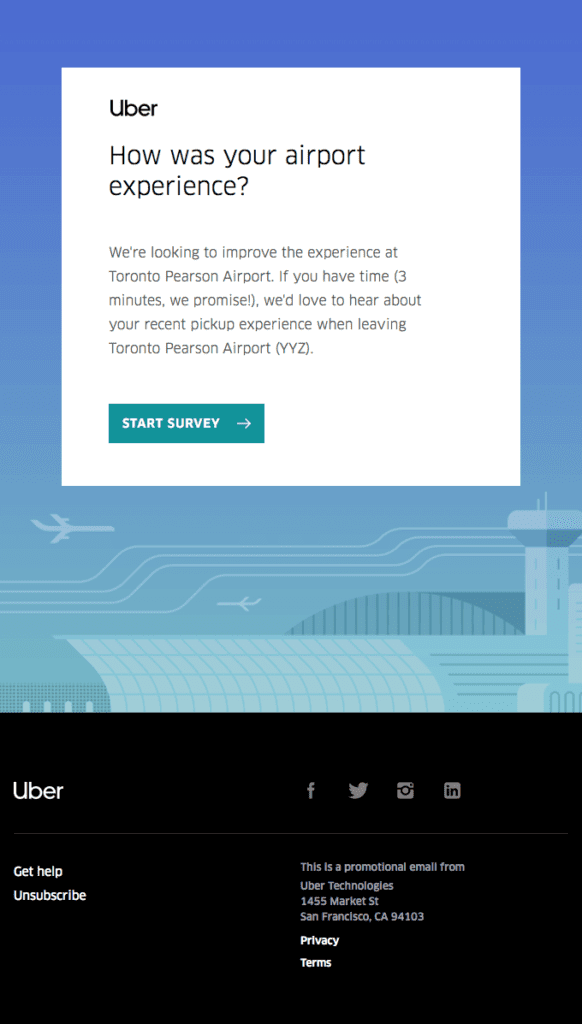
Uber uses automated survey emails to gather feedback after rides and deliveries. This strategy strengthens trust, boosts service quality, and opens doors for future engagement.
When the emails get sent
Survey emails are triggered shortly after a user completes a ride or delivery. Timing is key. Sending the survey while the experience is still fresh leads to more accurate and valuable responses.
For example, after a trip ends, the automation sends a short email asking about the driver’s professionalism, timeliness, and overall experience. These surveys are typically brief with simple rating choices and optional comment boxes. This low-effort format encourages higher completion rates because users are less likely to abandon a long questionnaire.
Using feedback to improve products and services
Uber uses the collected data to spot trends and areas for improvement. If a driver receives consistently low ratings, support teams can intervene with coaching or corrective actions. If many users complain about app performance, product teams can prioritize fixes.
Survey data also influences marketing messages. For highly satisfied customers, Uber might trigger follow-ups that ask them to join loyalty programs or try premium services. In contrast, customers with negative experiences may receive automated apologies and offers to make up for their dissatisfaction.
Personalization and segmentation
Uber’s survey automation sometimes segments audiences based on ride types, frequency, or service usage. For example, users who frequently order deliveries might receive surveys about food quality instead of ride comfort. This keeps feedback relevant and useful.
The email content remains concise and respectful of the user’s time. Typically, it includes a polite request for feedback, a simple rating system (such as stars or emojis), and a short text field for optional comments. This respectful approach boosts participation rates and improves data quality.
By embedding surveys into the user journey, Uber turns routine interactions into opportunities to learn and improve. These insights help create better services and deepen customer relationships — ultimately increasing lifetime value and retention.
This is how Uber did it:
Subject line: We want to hear from you
10. Wemo’s Birthday/Anniversary Email
Celebratory automated emails like birthday and anniversary messages are powerful emotional triggers. They show customers that the brand recognizes them as individuals, not just database entries. These personal touches improve loyalty, make customers feel valued, and often drive purchases tied to the celebration.
Wemo, a lifestyle and wellness brand, leverages birthday and anniversary automation to create engaging, human-focused messaging that strengthens customer bonds.
Collecting the data
Birthday and anniversary emails rely on data collected at sign-up or during checkout. When customers provide their date of birth or the date they first made a purchase, the system stores it securely. This allows automated workflows to trigger personalized messages at the right time.
Crafting the celebratory message
Wemo’s birthday emails typically begin with warm, joyful greetings. They wish the customer well and thank them for being part of the brand’s community. The tone is personal and uplifting — like receiving a card from a friend.
What makes these emails effective is the next part: offering value that feels tied to the celebration. Instead of generic content, Wemo often includes exclusive birthday offers such as discount codes, free shipping, or bonus reward points. These gifts make customers feel appreciated and provide a nudge toward purchasing.
Tailoring anniversaries
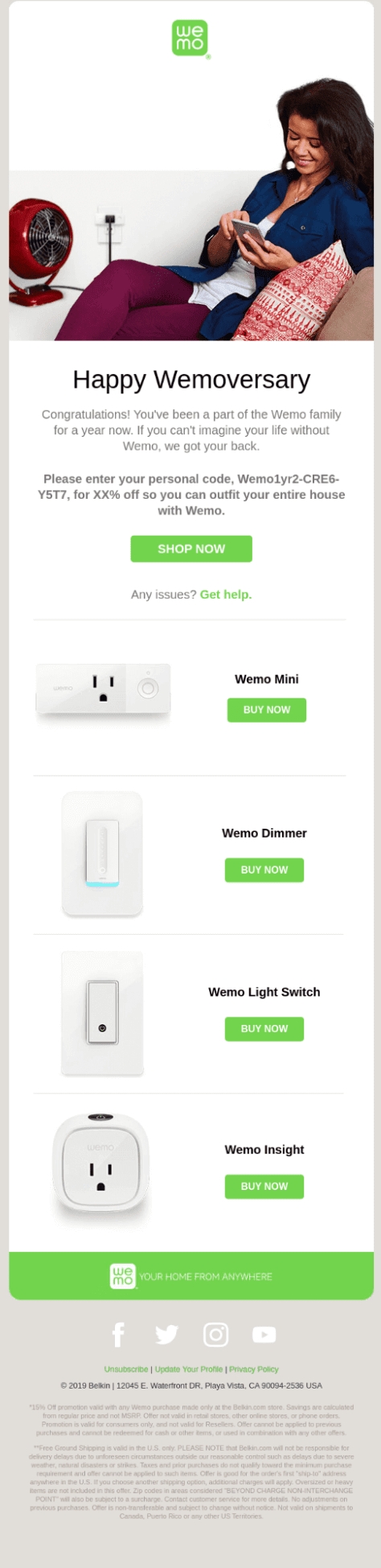
Anniversary emails celebrate milestones such as the date a customer joined the mailing list, first made a purchase, or reached a membership level. Wemo’s anniversary campaigns say something like “Happy 1-Year with Us!” or “Celebrating Your Journey.” These messages pair heartfelt recognition with special offers that reward loyalty.
Strategic timing and automation
These automated emails typically go out one day before or on the actual date. Some workflows include follow-ups — for example, a reminder if the customer hasn’t used their special offer within a few days. This increases the chances of conversion.
Building long-term relationships
Birthday and anniversary emails are not about selling alone — they are about emotional connection. When customers feel seen and appreciated, they are more likely to engage and stay loyal. This loyalty translates into repeat purchases and stronger brand advocacy.
Wemo’s automation strategy shows how thoughtful, personal triggers can deepen customer relationships while also driving revenue. By aligning promotions with real human moments, brands make their emails feel less like marketing and more like genuine celebration.
Let’s see an interesting anniversary email by Wemo:
Subject line: Exclusive gift for your 1-year anniversary
How To Set Up Successful Automated Email Campaigns
The examples above show how powerful email automation can be. Now it is time to build your own workflow. If you are new to automation, follow these clear steps to get started the right way.
1. Choose the right email marketing platform
Start with a reliable email marketing tool that offers strong automation features. Look for platforms like Teno Mail or Mailchimp that provide workflow builders, segmentation, analytics, and personalization tools. Review their pricing plans and features carefully. If possible, test the platform through a free trial or demo before making a final decision.
2. Define your goals and choose the right triggers
Decide what you want to achieve. Do you want more sales, better engagement, or stronger customer retention? Based on your goal, select the right type of automated emails. These could include welcome emails, cart abandonment reminders, re-engagement campaigns, or post-purchase follow-ups. Study what competitors in your niche are doing and identify opportunities to stand out.
3. Design or select the right email template
Choose a template that matches your campaign type and brand identity. Make sure the layout is clean and mobile-friendly. If needed, build your email from scratch to create a unique design. Focus on writing clear, persuasive copy that guides readers toward one main action.
4. Personalize your emails
Use customer data to make your emails more relevant. Add the subscriber’s name, recommend products based on past behavior, or tailor content to their interests. The more relevant the message, the higher the engagement and conversion rates.
5. Test different variations
Run A/B tests to compare subject lines, call-to-action buttons, visuals, or sending times. Testing helps you understand what your audience prefers and improves overall campaign performance.
6. Monitor performance and optimize
Track key metrics such as open rates, click-through rates, and conversions. Analyze the data carefully. If something is not working, adjust your content, timing, or targeting. Continuous improvement leads to stronger results over time.
Ready to build your first or next email automation workflow? Sign up for a Teno Mail account and try our amazing features for free!
Read More: Drip Marketing: The Ultimate Guide With Examples [2026]