Email marketing continues to be one of the most powerful digital marketing channels as we move into 2026. Despite the rapid growth of social media, messaging apps, and AI-driven communication tools, email remains central to how businesses build relationships, drive conversions, and retain customers. What makes email so enduring is its ability to reach people directly, across every demographic and device, with highly targeted, personalized messages that can be tailored to individual behavior, preferences, and lifecycle stage.
In recent years, developments in artificial intelligence, automation, accessibility guidelines, and data privacy have reshaped how effective email campaigns are designed and executed. Instead of sending generic messages to vast audiences, modern email marketing focuses on relevance, value, inclusivity, and trust. This shift has made strategic planning — from goal setting to execution — more important than ever before.
The best practices outlined here are designed to help businesses of all sizes approach email marketing in a way that maximizes engagement, improves deliverability, and drives measurable business outcomes in 2026 and beyond.
Set distinct goals
Before you create your first email or launch a campaign, it’s essential to establish clear, specific goals that define what success looks like for your email marketing efforts. Without well-defined goals, you won’t have a reliable way to measure performance, optimize campaigns, or align your team’s efforts toward outcomes that matter.
Why goals matter
Goals provide direction and purpose. They help you make strategic decisions about the types of emails you send, how often you send them, the audiences you target, and how you measure performance. Setting goals prevents guesswork and ensures your email program contributes meaningfully to broader business objectives — whether that’s increasing sales, nurturing leads, building brand awareness, or improving customer retention.
Types of goals to set
Here are common categories of email marketing goals that 2026 email strategies should consider:
1. Engagement Goals
Focus on how subscribers interact with your emails. This can include:
-
Increasing open rates
-
Improving click-through rates
-
Boosting replies or responses
Engagement metrics show whether your content resonates with your audience and encourages them to interact with your messages.
2. Conversion Goals
These goals relate to actions you want recipients to take after reading your email, such as:
-
Making a purchase
-
Downloading a resource
-
Registering for an event
-
Signing up for a webinar
Conversion goals are tied directly to revenue or meaningful outcomes for your business.
3. List Growth Goals
A healthy, growing subscriber list keeps your email channel vibrant. Examples include:
-
Increasing total subscribers
-
Reducing unsubscribe rates
-
Increasing confirmed opt-ins through lead magnets
Focusing on list quality and growth ensures your messages reach people who truly want to hear from you.
4. Lifecycle and Retention Goals
Emails sent throughout the customer journey help keep your brand top-of-mind:
-
Improve retention through welcome, onboarding, and re-engagement sequences
-
Reactivate dormant subscribers
-
Encourage repeat purchases
Lifecycle goals help nurture relationships beyond one-off campaigns.
How to define effective goals
Use the SMART framework to establish goals that are:
-
Specific: Clearly state what you want to achieve
-
Measurable: Ensure there’s a metric you can track
-
Achievable: Set realistic targets based on past performance
-
Relevant: Align with your overall marketing and business objectives
-
Time-bound: Give each goal a deadline for evaluation
For example:
-
Increase click-through rate by 15% in the next six months
-
Grow the email subscriber list by 20% by the end of Q2
-
Reduce unsubscribe rate to below 0.5% by year-end
Aligning goals with strategy
Once you’ve chosen your goals, every part of your email strategy — from segmentation and personalization to send frequency and content types — should align with them. For instance, if your primary goal is conversion, you might prioritize segmented promotional campaigns with clear calls-to-action, while a retention goal might focus on loyalty and re-engagement sequences.
Setting distinct goals at the outset gives your email marketing program purpose and clarity. It transforms email from a routine task into a strategic business driver that can be measured, optimized, and scaled for long-term success.
Use a “human” sender name
In 2026, inboxes are more crowded than ever, and recipients decide whether to open an email in seconds. One of the most overlooked yet impactful factors influencing open rates is the sender name. Using a “human” sender name — instead of a generic brand or no-reply address — helps establish trust, familiarity, and authenticity before the email is even opened.
Why a human sender name works

People are more likely to open emails from someone they perceive as a real person rather than an automated system. A human sender name signals that the message is conversational, helpful, and worth attention. It reduces the feeling of being marketed to and increases the sense of personal communication.
For example, emails sent from:
-
“Sarah from Acme”
-
“Alex | Customer Success”
-
“John at BrightTech”
tend to outperform emails sent from:
-
“No-Reply”
-
“Marketing Team”
A human sender name creates emotional connection and reinforces brand credibility at the same time.
Best practices for choosing a sender name
To maximize effectiveness:
-
Use a consistent name so subscribers recognize you over time
-
Combine a person’s name with the brand for clarity and trust
-
Avoid misleading names that pretend to be an individual when no support exists
-
Match the sender to the email type (e.g., sales emails from sales, onboarding emails from customer success)
Consistency is especially important. Frequently changing sender names can confuse subscribers and reduce recognition in the inbox.
Impact on deliverability and engagement
Modern spam filters analyze engagement signals. Emails opened, read, and replied to improve sender reputation over time. Human sender names often generate better engagement, which can indirectly support inbox placement and long-term deliverability.
A human sender name transforms your email from a broadcast message into a conversation — a key expectation for email marketing success in 2026.
Send welcome emails
Welcome emails are among the highest-performing email types, and in 2026 they remain a critical foundation of any successful email strategy. They set expectations, establish trust, and shape how subscribers perceive your brand from the very first interaction.
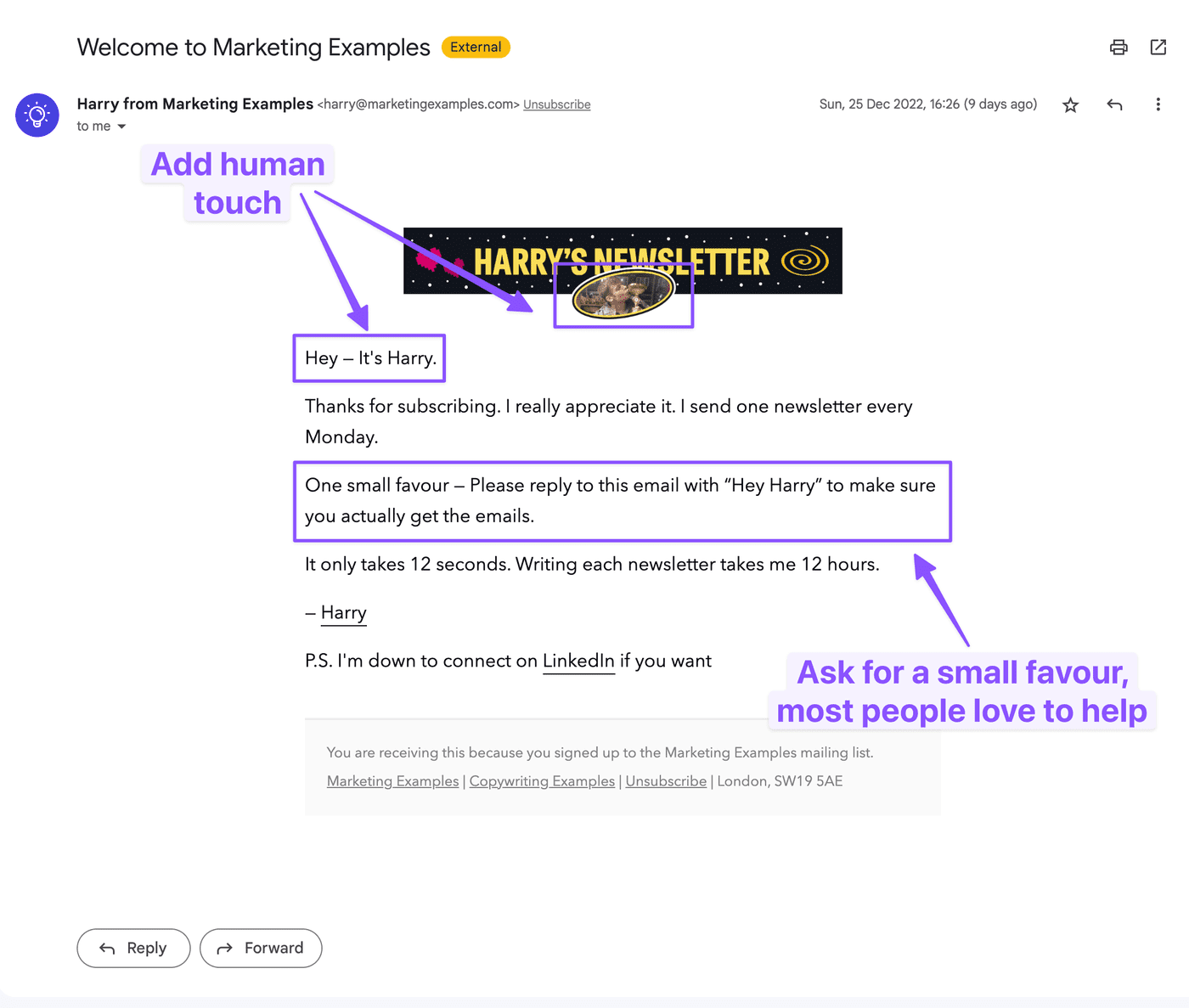
Why welcome emails matter
When someone subscribes, their interest is at its peak. A timely welcome email:
-
Confirms the subscription
-
Reinforces why they signed up
-
Introduces your brand’s value
-
Encourages immediate engagement
Failing to send a welcome email — or delaying it — wastes a crucial opportunity to build momentum and trust.
What an effective welcome email includes
A strong welcome email should focus on clarity, warmth, and value. Key elements include:
-
A friendly introduction that thanks the subscriber
-
A clear explanation of what to expect (content type, frequency)
-
Your brand’s value proposition and how it helps the reader
-
A simple next step, such as reading a resource or exploring your product
-
Contact or support information to build transparency
Avoid overwhelming new subscribers with too many offers or long blocks of content. The goal is to make them feel welcomed, not sold to.
Welcome email sequences in 2026
Instead of a single email, many brands now use welcome sequences:
-
Email 1: Immediate welcome and confirmation
-
Email 2: Education or onboarding content
-
Email 3: Social proof, testimonials, or success stories
-
Email 4: Soft conversion or engagement prompt
This gradual approach builds familiarity and nurtures trust without pressure.
Performance benefits
Welcome emails consistently achieve higher open and click rates than regular campaigns. They also improve long-term engagement by setting the tone for future communications. Subscribers who receive a well-designed welcome email are more likely to remain active and engaged over time.
Optimise for mobile devices
By 2026, mobile devices dominate email consumption. Most subscribers now read emails on smartphones or tablets, often in short sessions while multitasking. If your emails are not optimized for mobile, you risk losing engagement before your message is even read.
Mobile optimization is no longer optional
A poor mobile experience — such as tiny text, broken layouts, or hard-to-tap buttons — leads to quick deletions and unsubscribes. Mobile optimization ensures your emails are readable, accessible, and actionable regardless of screen size.
Key mobile optimization principles
1. Use responsive design
Emails should automatically adapt to different screen sizes. Responsive layouts adjust text, images, and buttons for readability on small screens.
2. Keep content concise and scannable
Mobile readers skim. Use:
-
Short paragraphs
-
Clear headings
-
Bullet points
-
Adequate spacing
Place the most important message at the top so it’s visible without scrolling.
3. Make calls-to-action mobile-friendly
Buttons should be:
-
Large enough to tap easily
-
Clearly labeled
-
Spaced away from other elements
Avoid small text links that are difficult to click on touchscreens.
4. Optimize images for performance
Large images can slow load times on mobile networks. Use optimized image sizes and ensure emails remain understandable even if images don’t load.
Testing across devices
Always test your emails on multiple devices and email apps before sending. What looks perfect on desktop may appear cluttered or broken on mobile. Testing helps identify formatting issues, font size problems, and CTA placement errors.
Optimizing for mobile devices ensures your emails meet subscribers where they are — on the go, short on time, and expecting seamless experiences. In 2026, mobile-first email design is essential for engagement, retention, and results.
Craft engaging subject lines
Subject lines are the gatekeepers of your email campaigns. In 2026, with inbox competition at an all-time high and attention spans shrinking, an engaging subject line is no longer just creative copy — it’s a strategic tool that directly impacts open rates, engagement, and deliverability.
Why subject lines matter more than ever
Most subscribers decide whether to open an email based on three elements: the sender name, the subject line, and the preview text. Among these, the subject line carries the most weight. A weak or misleading subject line can result in ignored emails, while a strong one sets clear expectations and motivates action.
Modern email platforms also track engagement signals. Subject lines that consistently drive opens and interactions help maintain a positive sender reputation over time.
Characteristics of high-performing subject lines
1. Clear and specific
Subject lines should quickly communicate value. Avoid vague phrases that force readers to guess what’s inside. Instead, highlight the benefit or outcome the reader can expect.
2. Concise and mobile-friendly
Most subject lines are read on mobile devices. Aim for clarity within a limited character count so the key message appears without being cut off.
3. Relevant and timely
Subject lines that align with subscriber interests, recent behavior, or current needs perform better. Relevance builds trust and reduces the risk of unsubscribes.
4. Conversational and human
A natural, human tone feels more personal than overly promotional language. Subject lines that sound like real communication tend to resonate more in 2026 inboxes.
5. Curiosity without clickbait
Creating intrigue is effective, but the content must deliver on the promise. Misleading subject lines damage credibility and engagement over time.
Personalization and testing
Personalized subject lines — such as referencing a subscriber’s interest, location, or stage in the customer journey — can significantly improve open rates when used thoughtfully. Additionally, testing different subject line styles helps identify what resonates best with your audience, allowing for continuous improvement based on real performance data.
A strong subject line sets the tone for the entire email. When crafted with clarity, relevance, and intent, it turns inbox impressions into meaningful engagement.
Focus on accessibility
Accessibility is a core requirement for effective email marketing in 2026, not an optional enhancement. Inclusive emails ensure that people of all abilities can read, understand, and interact with your content. Beyond compliance considerations, accessible emails improve overall usability and engagement for every subscriber.
Why accessibility matters
Accessible email design:
-
Expands your reach to a broader audience
-
Enhances readability and clarity
-
Improves user experience across devices
-
Demonstrates social responsibility and professionalism
Designing with accessibility in mind also encourages cleaner layouts, clearer messaging, and more intentional content structure.
Alt text for images
Alt text provides descriptive information for images when they fail to load or when screen readers are used. Every meaningful image should include concise, descriptive alt text that explains its purpose. Avoid repeating surrounding text or using vague phrases. If an image is purely decorative, it should be marked accordingly so screen readers can skip it.
Text contrast
Proper contrast between text and background is essential for readability. Low contrast makes content difficult to read for users with visual impairments and those viewing emails in bright environments. Use high-contrast color combinations to ensure text stands out clearly without causing eye strain.
Readable fonts
Choose simple, legible fonts that are easy to read on all screen sizes. Avoid decorative or overly stylized fonts for body text. Font size should be large enough for comfortable reading on mobile devices, with sufficient line spacing to prevent visual clutter.
Meaningful link text
Links should clearly describe where they lead. Avoid generic phrases like “click here” or “learn more” without context. Descriptive link text helps screen reader users understand the action and improves overall clarity for all readers.
Avoid image-only emails
Emails made entirely of images create major accessibility and deliverability issues. If images fail to load, the message becomes unreadable. Always include real, text-based content that communicates the core message clearly, with images used only to support the text.
Have structured content
Well-structured emails are easier to read and navigate. Use clear headings, short paragraphs, bullet points, and logical content flow. Structure helps screen readers interpret the email correctly and allows all users to scan content quickly.
Test with screen readers
Testing emails with screen readers helps identify accessibility gaps that may not be obvious visually. This ensures your content flows logically, images are properly described, and links make sense when read aloud. Regular testing helps refine accessibility practices and ensures inclusive communication.
Focusing on accessibility ensures your email marketing is inclusive, user-friendly, and future-ready. In 2026, accessible emails are not just better for users with disabilities — they create clearer, more effective communication for everyone.
Automate critical emails
Automation is a cornerstone of effective email marketing in 2026. As subscriber expectations continue to rise, sending the right message at the right time is no longer achievable through manual effort alone. Automating critical emails ensures timely, relevant communication while saving time and maintaining consistency across customer interactions.
What are critical emails?
Critical emails are messages triggered by specific user actions or lifecycle events. These emails are expected by recipients and often carry high intent. Common examples include:
-
Welcome and onboarding emails
-
Account confirmations and verification messages
-
Password resets and security alerts
-
Order confirmations and transactional updates
-
Re-engagement emails for inactive subscribers
Because these emails are directly tied to user behavior, delays or inconsistencies can damage trust and user experience.
Benefits of automation
Automating essential emails provides several advantages:
-
Timeliness: Emails are sent instantly when an action occurs
-
Relevance: Messages are triggered by real behavior, not assumptions
-
Consistency: Every subscriber receives the same quality experience
-
Scalability: Automation supports growth without added manual workload
In 2026, automation is also increasingly intelligent, allowing workflows to adapt based on engagement, preferences, and lifecycle stage.
Best practices for automated emails
Even though emails are automated, they should never feel robotic. Use clear language, a human tone, and concise messaging. Review automated emails regularly to ensure information is accurate, branding is consistent, and content remains relevant as your business evolves.
Automating critical emails strengthens customer trust and ensures your brand shows up reliably when subscribers expect it most.
Personalise emails if possible
Personalization has evolved far beyond inserting a subscriber’s first name. In 2026, effective email personalization focuses on relevance, context, and timing, using available data to deliver content that feels tailored rather than intrusive.
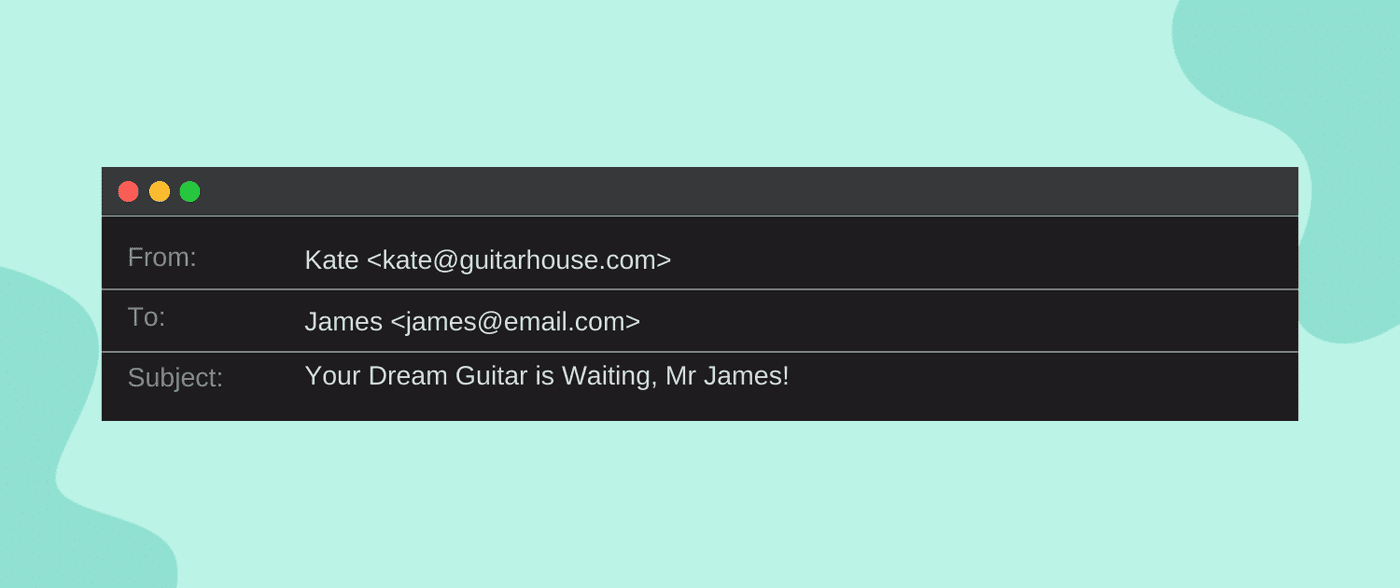
Why personalization matters
Subscribers expect brands to understand their needs and preferences. Personalized emails:
-
Increase engagement and click-through rates
-
Improve customer satisfaction
-
Reduce unsubscribe rates
-
Strengthen long-term relationships
When done correctly, personalization makes emails feel helpful and timely instead of promotional.
Types of personalization to consider
Behavioral personalization
Send emails based on actions such as page visits, downloads, purchases, or email interactions. This ensures content aligns with current interest.
Lifecycle personalization
Adjust messaging depending on whether a subscriber is new, active, inactive, or a returning customer. Each stage requires different communication.
Preference-based personalization
Allow subscribers to choose what content they want and how often they receive emails. Respecting preferences builds trust and engagement.
Contextual personalization
Consider factors such as device type, time zone, or recent interactions to optimize timing and format.
Balance personalization and privacy
With increased awareness of data privacy, personalization should always be transparent and respectful. Use only data you have permission to collect, and ensure personalization adds genuine value. Over-personalization or unexpected data usage can feel invasive and damage trust.
Personalization in 2026 is about relevance, not volume. Even small, thoughtful personal touches can significantly improve email performance.
Stay consistent with branding
Consistent branding across email campaigns reinforces recognition, credibility, and trust. In 2026, when subscribers interact with brands across multiple channels, email should feel like a natural extension of the overall brand experience.
Why branding consistency matters
When branding is consistent, subscribers can immediately identify who the email is from and what to expect. Inconsistent visuals, tone, or messaging can create confusion and reduce trust.
Strong branding helps:
-
Build familiarity over time
-
Reinforce brand values and personality
-
Create a cohesive customer journey
-
Improve recognition in crowded inboxes
Key elements of consistent branding
Visual identity
Use consistent colors, fonts, logo placement, and layout styles. Emails should align with your website and other marketing materials without feeling overly rigid.
Tone and voice
Maintain a consistent writing style that reflects your brand’s personality — whether professional, friendly, conversational, or authoritative. This consistency builds emotional connection.
Messaging and values
Ensure your emails communicate the same values and promises your brand stands for. Avoid mixed messages or sudden shifts in positioning.
Create a reusable framework
Using templates and brand guidelines helps maintain consistency while allowing flexibility for different campaign types. Regular audits of your email content can help identify inconsistencies and ensure your branding remains aligned as your business grows.
Staying consistent with branding ensures your emails feel familiar, trustworthy, and intentional — qualities that are essential for long-term email marketing success in 2026.
Test emails before sending
Testing emails before sending is a critical step that separates effective email marketing from costly mistakes. In 2026, emails must render correctly across dozens of devices, operating systems, and inbox environments while also meeting accessibility, deliverability, and engagement standards. Skipping testing can lead to broken layouts, unclear messaging, or damaged trust.
Why testing is essential
Even small errors can have large consequences. A broken link, misaligned layout, or incorrect personalization field can reduce engagement or make your brand appear unprofessional. Testing helps ensure your message is clear, functional, and aligned with your goals before it reaches subscribers.
What to test before sending
Content accuracy
Check for spelling, grammar, tone, and clarity. Ensure personalization fields display correctly and fallback values are in place.
Links and calls-to-action
Verify that every link works and directs users to the intended destination. Buttons should be clickable and clearly labeled on all devices.
Design and layout
Test how the email appears on desktop and mobile devices. Confirm that images load correctly, spacing is consistent, and text remains readable.
Accessibility elements
Review alt text, heading structure, contrast, and link clarity to ensure inclusive readability.
Timing and automation logic
For automated campaigns, confirm triggers, delays, and conditions function as intended so emails are sent at the right moment.
Thorough testing reduces risk and increases confidence that your email will perform as expected.
Have an email preview link
An email preview link allows recipients to view your email in a web browser if it doesn’t display correctly in their inbox. In 2026, this small addition plays an important role in usability, accessibility, and overall experience.
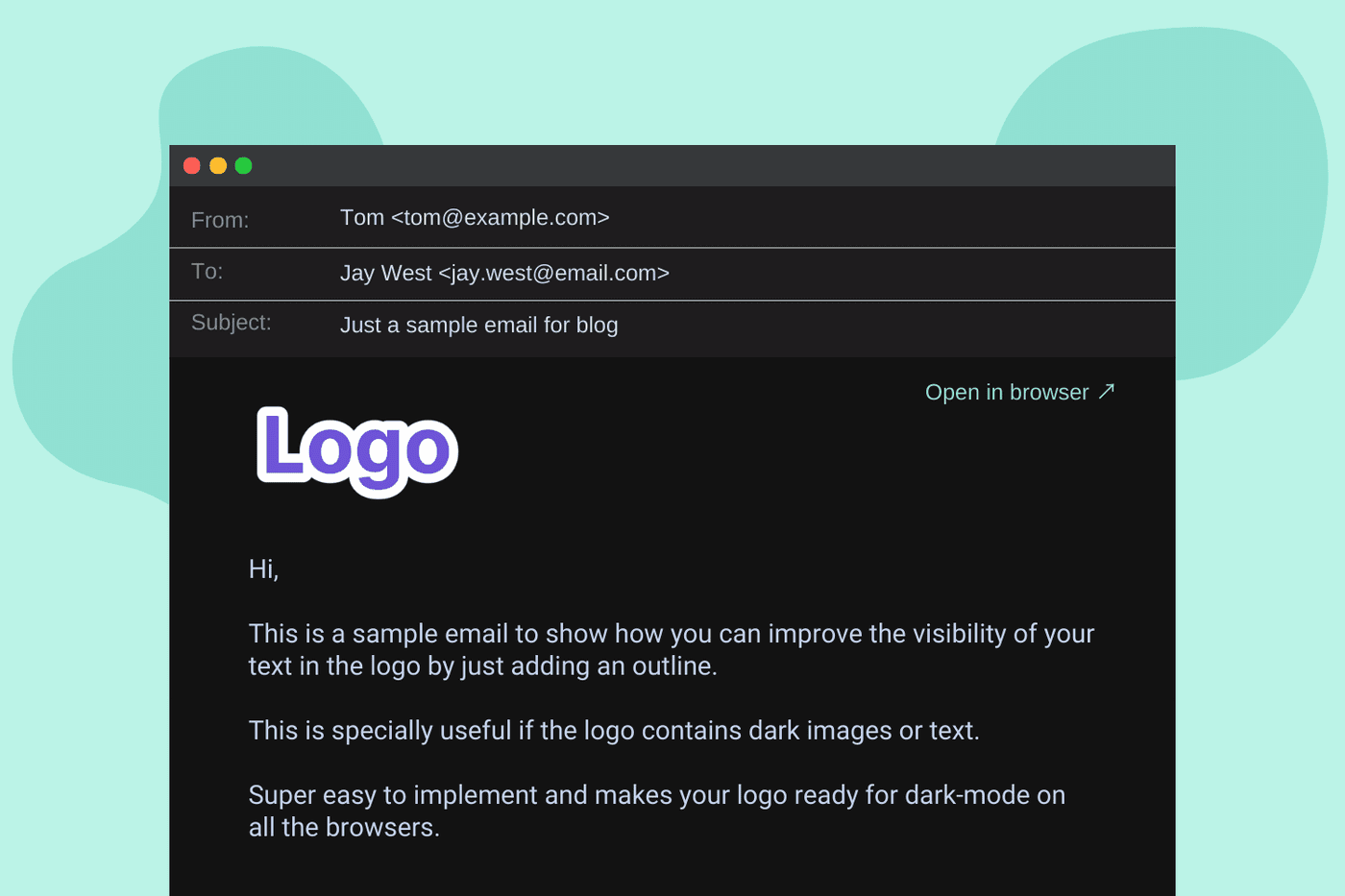
Why preview links matter
Email clients vary widely in how they render content. A preview link ensures:
-
Subscribers can access the full message even if images or styles don’t load
-
Users can read emails on any device or browser
-
Content remains accessible for users with older or restrictive email clients
Preview links act as a safety net, ensuring your message is never completely lost due to technical limitations.
Best practices for preview links
Place the preview link near the top of the email so it’s easy to find. Use clear, descriptive text such as “View this email in your browser” rather than vague instructions. The preview version should match the inbox version closely, maintaining branding and content structure.
Providing an email preview link demonstrates attention to user experience and helps ensure your message reaches every subscriber as intended.
Make it easy to unsubscribe
Making it easy to unsubscribe is not just a compliance requirement — it’s a best practice that builds trust and protects your email reputation. In 2026, respectful list management is essential for long-term success.
Why easy unsubscription matters
Subscribers’ needs and interests change over time. When users feel trapped or frustrated by complicated unsubscribe processes, they are more likely to mark emails as spam. This harms deliverability and damages your sender reputation.
An easy unsubscribe process:
-
Respects user choice
-
Reduces spam complaints
-
Improves list quality
-
Strengthens brand credibility
Best practices for unsubscribe experiences
Clear visibility
Place the unsubscribe link where users can easily find it, typically in the footer.
Simple process
Allow users to unsubscribe with one or two clicks. Avoid requiring logins or lengthy forms.
Offer preference options
When possible, allow subscribers to reduce frequency or select content preferences instead of fully unsubscribing. This can help retain engagement without forcing unwanted emails.
Immediate confirmation
Ensure unsubscribe requests are processed promptly and confirmed clearly.
Making it easy to unsubscribe shows respect for your audience and signals confidence in the value of your email content. A clean, engaged list is far more valuable than a large, unresponsive one — especially in 2026’s evolving email landscape.
Have a checklist
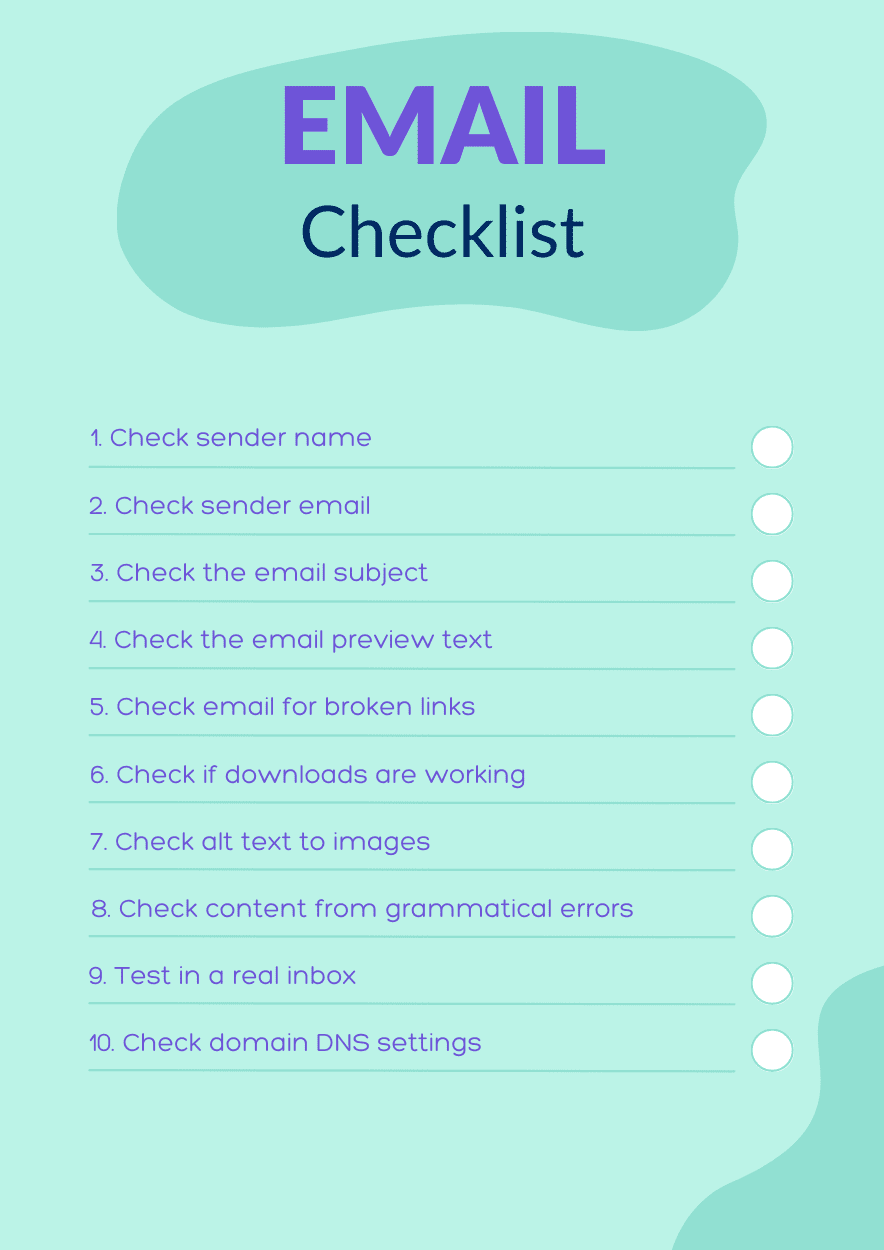
A well-defined email marketing checklist is an essential tool for maintaining quality, consistency, and performance in 2026. As email campaigns become more sophisticated — incorporating personalization, automation, accessibility, and branding — a checklist helps ensure no critical detail is overlooked before hitting send.
Why an email checklist matters
Email campaigns often involve multiple steps and stakeholders. Without a checklist, small but impactful errors can slip through, such as broken links, missing alt text, or inconsistent branding. A checklist creates a repeatable process that improves efficiency and reduces risk.
A strong checklist helps:
-
Maintain consistent quality across campaigns
-
Reduce errors and last-minute fixes
-
Improve team collaboration and accountability
-
Ensure alignment with best practices and goals
What to include in your email checklist
Strategy and goals
-
Clear campaign objective defined
-
Target audience and segment selected
-
Success metrics identified
Content and copy
-
Subject line aligned with email content
-
Clear value proposition and call-to-action
-
Tone matches brand voice
-
Spelling and grammar reviewed
Design and formatting
-
Mobile-responsive layout confirmed
-
Readable fonts and proper spacing used
-
Images optimized and relevant
-
Visual hierarchy supports easy scanning
Accessibility
-
Alt text added to all meaningful images
-
Text contrast meets readability standards
-
Links use descriptive, meaningful text
-
Content structured with headings and logical flow
Functionality and testing
-
All links and buttons tested
-
Personalization fields verified
-
Preview link included
-
Email tested across devices and inboxes
Compliance and trust
-
Sender name and address are clear
-
Unsubscribe link visible and functional
-
Preferences or frequency options available
Using a checklist turns best practices into habits. Over time, it improves both campaign quality and overall team confidence.
Final Thought
Email marketing in 2026 is no longer about sending more messages — it’s about sending better, more meaningful ones. The most successful email strategies are built on clarity, relevance, respect, and consistency. From setting distinct goals and writing engaging subject lines to prioritizing accessibility and user experience, each best practice plays a role in building trust and long-term engagement.
As inbox expectations continue to evolve, brands that treat email as a conversation rather than a broadcast will stand out. By following these best practices and committing to continuous testing and improvement, email can remain a powerful, reliable channel for connection, growth, and lasting customer relationships well beyond 2026.
Read More: Email Marketing Trends for 2026: Insights to Boost Every Send