Every business, service, or event eventually reaches a moment when something has to stop — a subscription ends, a booking gets canceled, or a service is no longer needed. A cancellation email is the standard way to confirm that a cancellation request has been received and processed. It keeps the customer informed, reduces confusion, and ensures a smooth end to the relationship.
These emails aren’t just administrative messages. They reflect your brand’s tone, influence customer perception, and can even leave the door open for future engagement. Whether someone chose to cancel or the company needs to cancel on them, a well-written cancellation email communicates key details clearly and respectfully.
What Is a Cancellation Email?

A cancellation email is a message sent to notify a person that a cancellation has been completed or acknowledged. This could come after someone cancels a subscription, leaves a service, or requests a refund. It can also be sent when the company itself needs to cancel an event, booking, or offering.
Cancellation emails serve several key purposes:
-
📩 Confirm the cancellation: Let the recipient know the request has been received and processed.
-
📆 Provide details: Tell them exactly what was canceled and when the change takes effect.
-
⏭ Explain next steps: Share any follow-up actions, such as refunds, access periods, or data retention policies.
-
🔄 Open the door for future engagement: When appropriate, include reassurance or a soft call-to-action to return later.
There are typically two main types of cancellation emails:
-
Customer-initiated cancellations: These are triggered when a user decides they want to stop a service or subscription.
-
Company-initiated cancellations: These happen when the business needs to cancel something on behalf of the customer — like an event due to weather, maintenance schedules, logistical changes, or service discontinuation.
In either case, the best cancellation emails are clear, respectful, and easy to understand. They should answer the customer’s main questions right away: Has it been canceled? What will happen next? Will I get a refund? Answering these with transparency strengthens trust and reduces customer confusion or frustration.
Cancellation Email Examples
Looking at real examples can help you see how some of the world’s leading brands handle cancellation communication. Below are four strong examples — each with a slightly different approach depending on the context, tone, and objective of the message.
1. Netflix – Subscription Cancellation Confirmation
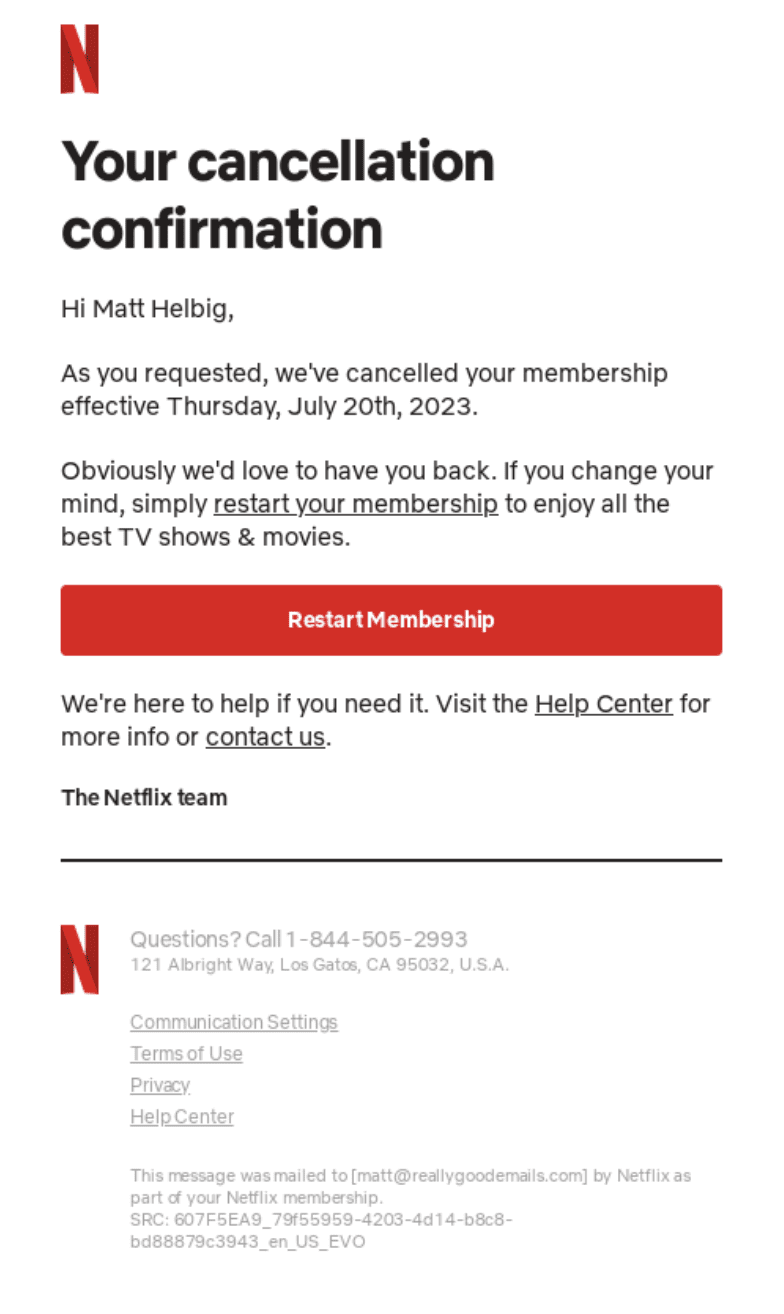
One of the simplest and most effective approaches is used by this popular streaming platform for subscription cancellations. Their email typically leads with an unmistakable subject line like:
“Your membership has been canceled”
This leaves zero ambiguity from the moment the message lands in the inbox. Inside, the email includes:
-
Confirmation of the cancellation
-
Effective end date, when access will stop
-
Reassurance that the user can restart anytime
This type of message is clean and neutral in tone. It delivers all essential information without additional marketing fluff. Importantly, it also leaves the door open for re-subscription without pressuring the user.
2. Hulu – A Touch of Emotion
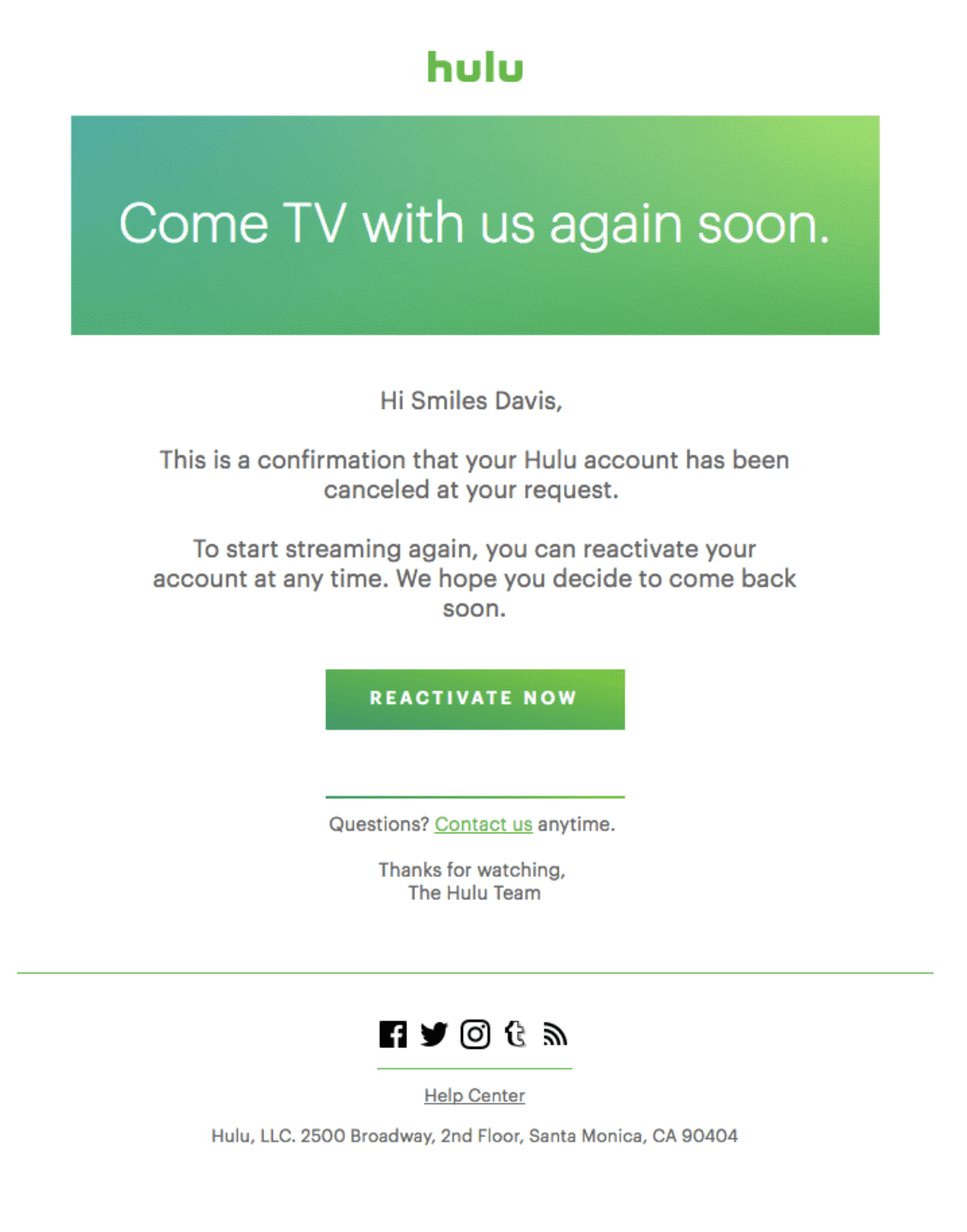
Some brands add a more personal, emotional touch while still confirming cancellation. For example, this streaming service might use a subject line like:
“Come back to watch with us soon”
This kind of message does more than confirm the cancellation; it acknowledges the human side of leaving — that the user may miss the entertainment, the escape, or the shared moments. Inside, the body:
-
Confirms that the request has been processed
-
Reinforces the possibility of reactivation
-
Includes a CTA button to return easily
This approach balances clarity with a friendly, warm tone that makes the recipient feel appreciated rather than forgotten.
3. Airbnb – Clarity and Reassurance
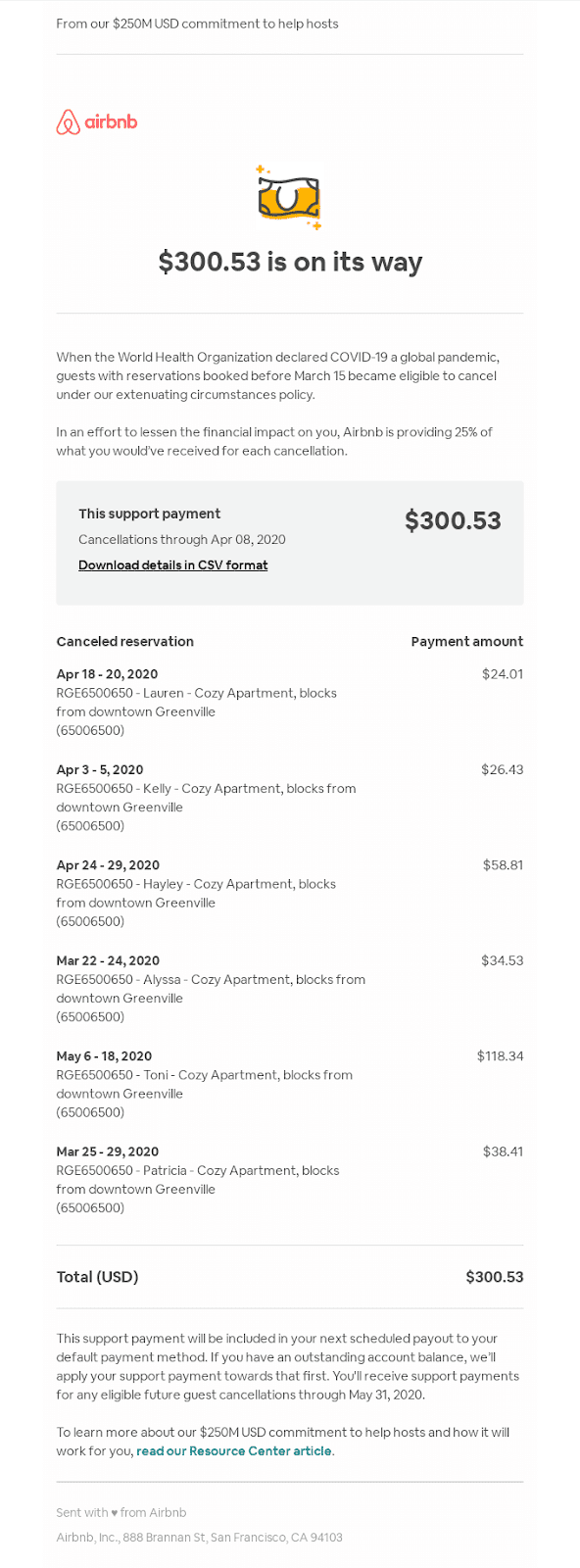
When it comes to cancellations involving bookings or reservations, clarity becomes even more important because it can affect travel plans and financial commitments. For instance, a message confirming a stay cancellation covers:
-
Refund details, where applicable
-
Final payment or credit information
-
What happens next — for example, how to rebook or claim compensation
Rather than promotional language, this type of message focuses on practical information and reassurance. It may also include links to customer support or FAQs so the recipient can explore further options if needed.
4. Captions – Feedback Invitation
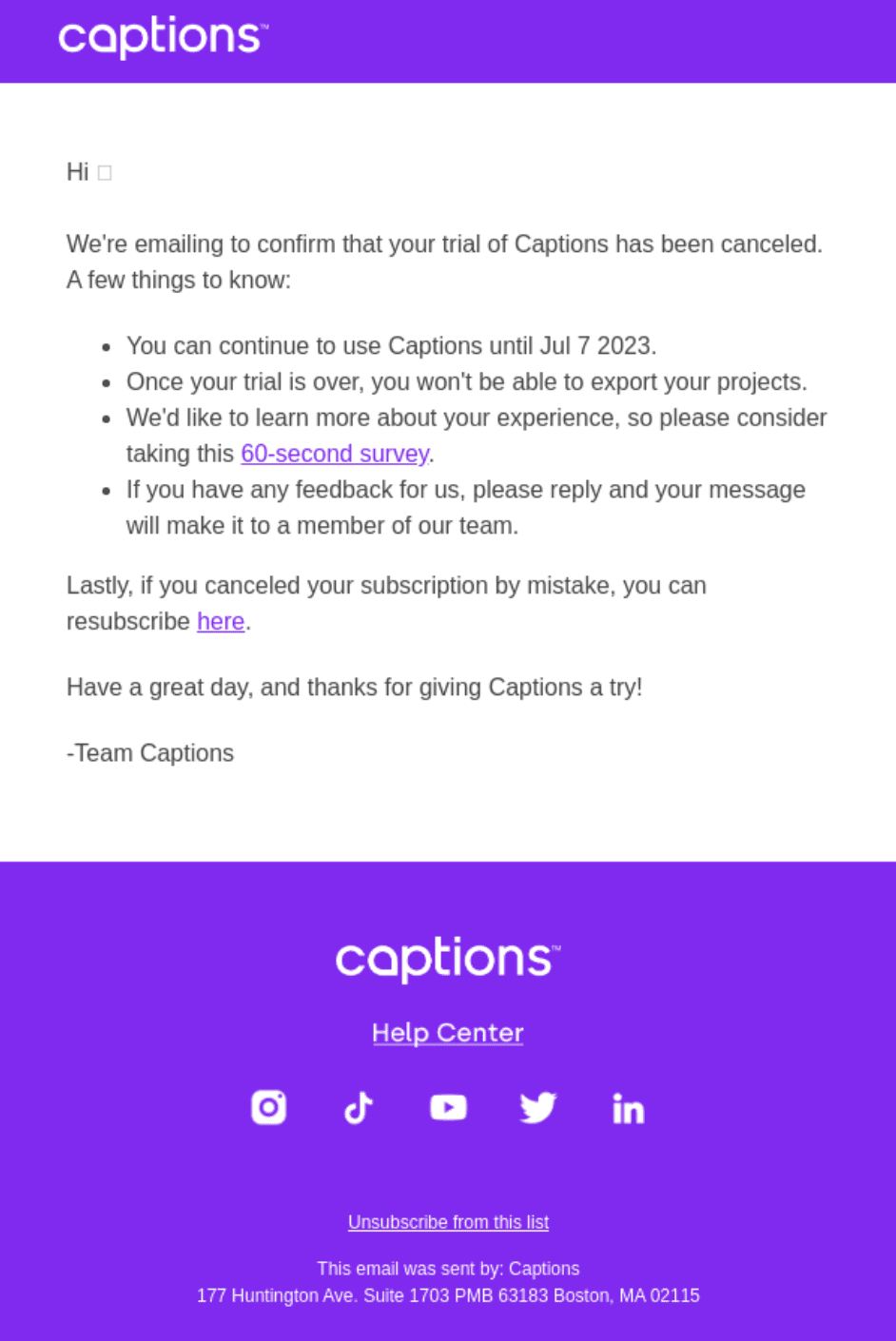
Some brands use the cancellation email as a chance to learn. Instead of only saying goodbye, they politely ask for feedback on why the user is leaving. This might look like:
“We’d love to know what made you cancel”
These messages often include a brief survey link or invitation to reply directly. This serves two purposes:
-
It shows that you care about the user’s experience
-
It provides valuable insights for improving retention in the future
The tone here is courteous and short, and the feedback request is optional so it doesn’t feel pushy or intrusive.
Each of these examples reflects a different focus — from plain confirmation to emotional resonance, practical clarity, and customer feedback. The best choice for your brand depends on your goals and audience, but they all share one key principle: they communicate cancellation clearly and respectfully.
How to Write a Cancellation Email

A cancellation email may look simple, but every line matters. It should remove confusion, answer key questions, and protect your brand reputation. Whether the cancellation was requested by the customer or initiated by your company, the structure must stay clear and professional.
Below is a step-by-step breakdown of how to write an effective cancellation email in today’s digital environment.
1. Subject Line: Be Direct
The subject line should immediately communicate what the email is about. Avoid vague phrases like “Update about your account.” Instead, use clear and specific wording.
Good examples include:
-
“Your subscription has been canceled”
-
“Confirmation of your cancellation request”
-
“Your booking cancellation is confirmed”
A direct subject line prevents confusion and reduces unnecessary support inquiries. It also builds trust because the recipient knows exactly what to expect before opening the email.
Keep it short. Keep it honest. Avoid promotional language in the subject unless you are intentionally inviting reactivation.
2. Greeting: Keep It Personal
Start with a simple, personalized greeting. Use the customer’s first name whenever possible.
For example:
-
“Hi Sarah,”
-
“Hello Michael,”
Personalization shows that the email is not just an automated system message, even if it is. It maintains a human connection at a moment when the relationship may be ending.
If personalization data is unavailable, keep it neutral but polite:
-
“Hello,”
-
“Dear Customer,”
Avoid overly formal greetings unless your brand voice requires it.
3. Confirmation Details
This is the most important part of the email. Clearly confirm that the cancellation has been processed. State exactly what was canceled and when it becomes effective.
Include:
-
The name of the service, plan, or booking
-
The cancellation date
-
The final access date (if access continues until the end of a billing cycle)
-
Refund information, if applicable
-
Billing impact (e.g., “You will not be charged again”)
For example:
“Your Premium Plan subscription has been successfully canceled. You will continue to have access until March 30, 2026. No further charges will be applied to your account.”
Avoid vague wording. Ambiguity creates confusion and leads to support tickets.
In cases like event cancellations or booking cancellations, clearly explain refund timelines. If refunds take 5–10 business days, state that. Transparency prevents frustration later.
4. Optional Empathy Statement
Not every cancellation email needs emotional language, but sometimes it helps. A brief empathy statement acknowledges the situation without sounding dramatic.
For customer-initiated cancellations, you might say:
“We’re sorry to see you go.”
“We appreciate the time you’ve spent with us.”
For company-initiated cancellations:
“We apologize for any inconvenience this may cause.”
“We understand this may affect your plans.”
Keep it short. Overly emotional messaging can feel forced. The goal is simple acknowledgment, not persuasion.
5. Additional Info or Next Steps
This section answers the question: What happens now?
Depending on the situation, include relevant next steps such as:
-
Instructions on restarting the subscription
-
How to download account data before deletion
-
Refund processing details
-
Alternative services or rebooking options
-
Contact information for support
For example:
“If you change your mind, you can reactivate your subscription anytime by logging into your account.”
Or:
“Your refund will be processed within 7 business days to your original payment method.”
Modern cancellation emails often include helpful links to:
-
Account settings
-
Help center
-
Support team
-
FAQ pages
Providing these reduces uncertainty and improves user experience.
6. CTA (Optional)
A call-to-action (CTA) is optional but can be strategic. It depends on your business goals.
Common CTAs include:
-
“Restart your subscription”
-
“Reactivate your account”
-
“Rebook your stay”
-
“Share feedback”
-
“Explore other plans”
If you add a CTA, make sure it does not overshadow the confirmation itself. The cancellation must remain the primary message.
For retention purposes, some companies include:
-
A limited-time offer
-
A discount to return
-
A short feedback survey
However, avoid being aggressive. A cancellation email is not a hard sales pitch. The tone should remain respectful.
7. Signature
End the email with a professional closing and clear sender identity.
Examples:
-
“Best regards,
The [Company Name] Team” -
“Sincerely,
Customer Support Team”
Including:
-
Company name
-
Support email address
-
Website link
adds legitimacy and trust.
For branded emails, include:
-
Company logo
-
Physical address (if required by law)
-
Unsubscribe links for marketing messages
Compliance with email regulations is essential, especially if your cancellation email contains promotional elements.
Cancellation Email Templates
Template #1: Subscription or Service Cancellation Confirmation (Customer-Initiated)
This template is used when a customer decides to cancel their subscription, membership, or recurring service. The main goal is to confirm the request, explain billing details, and leave the door open for future engagement.
Subject: Your subscription has been canceled
Hi [First Name],
We’re writing to confirm that your cancellation request has been successfully processed.
Your [Plan/Service Name] subscription has been canceled as of [Cancellation Date]. You will continue to have access to your account and features until [Access End Date].
Here’s what this means for you:
-
You will not be charged again.
-
Your current access remains active until the end of your billing period.
-
Any eligible refund will be processed within [X] business days to your original payment method.
If you change your mind, you can reactivate your subscription anytime by logging into your account.
We appreciate the time you’ve spent with us. If you’d like to share feedback about your experience, we’d love to hear from you.
If you have any questions, our support team is here to help at [Support Email/Link].
Best regards,
[Company Name] Team
Template #2: Company-Initiated Cancellation (Event or Service)
This template applies when the company must cancel a service, event, or booking. In these situations, clarity and reassurance are essential. Customers may feel frustrated, so the message should be transparent and solution-focused.
Subject: Important Update: Your booking has been canceled
Hi [First Name],
We regret to inform you that your [Event/Service Name] scheduled for [Date] has been canceled due to [Reason – e.g., unforeseen circumstances, operational changes, weather conditions].
We understand this may impact your plans, and we sincerely apologize for any inconvenience caused.
Here’s what happens next:
-
A full refund of [Amount] will be issued to your original payment method.
-
Refund processing may take [X–Y business days].
-
You may reschedule or explore alternative dates using the link below.
If you prefer assistance, our support team is available at [Support Email/Phone].
Thank you for your understanding. We truly value your trust and hope to serve you again soon.
Sincerely,
[Company Name] Team
Wrapping Up
A cancellation email may seem like a small message, but it plays a big role in customer experience. It marks the end of a transaction, and sometimes the end of a relationship. When handled correctly, it leaves a positive final impression.
The best cancellation emails are clear, direct, and respectful. They confirm the action without confusion. They explain billing or refund details in simple terms. They provide next steps and offer support when needed.
Some brands keep their cancellation emails short and neutral. Others add warmth or invite feedback. The right approach depends on your business goals and audience expectations. What matters most is transparency.
Remember that a cancellation does not always mean goodbye forever. A smooth and professional cancellation experience increases the chance that customers may return in the future.
Read More: Drip Marketing: The Ultimate Guide With Examples [2026]