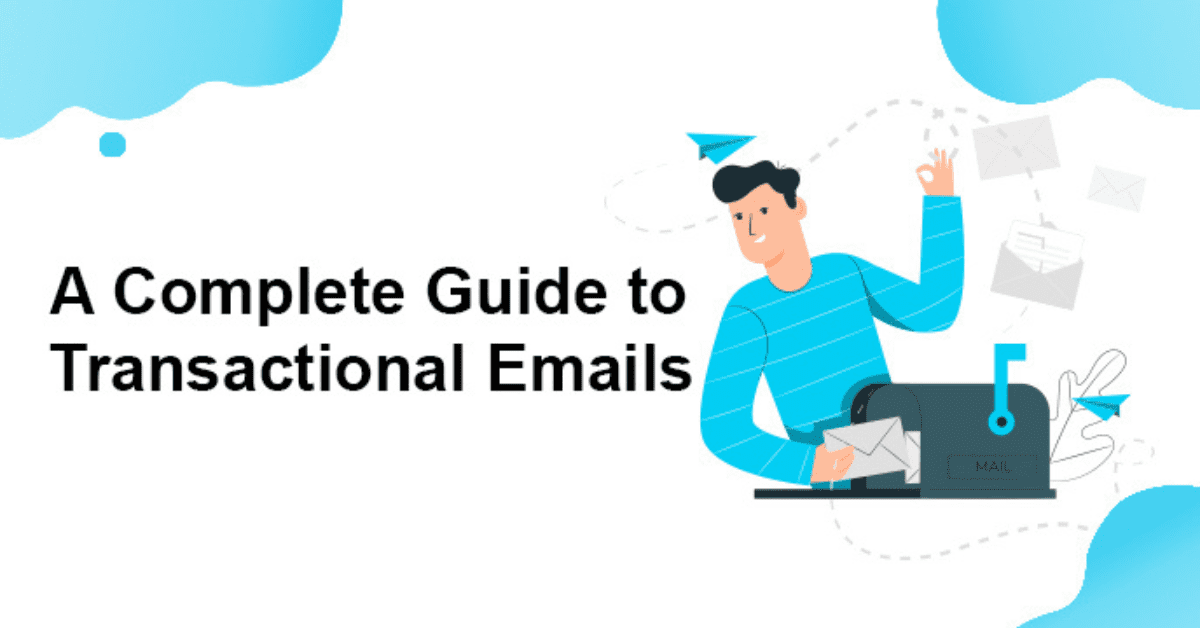
Transactional emails are often treated as simple system notifications, but in reality, they play a critical role in shaping user trust, experience, and brand perception. Every password reset, order confirmation, login alert, or account update is a moment where users expect clarity, accuracy, and speed. When these emails work well, users feel confident and supported. When they fail, frustration and support requests quickly follow.
As digital products and online services become more complex in 2026, transactional emails must do more than “just deliver information.” They need to be reliable, accessible, easy to understand, and designed around real user behavior. Small improvements—such as clearer copy, faster delivery, or better structure—can significantly reduce confusion and improve overall engagement.
This guide breaks down practical, proven best practices for transactional emails, focusing on usability, deliverability, and trust. Whether you manage a SaaS platform, an eCommerce store, or a user-driven application, these principles will help you create transactional emails that truly support your users.
What Are Transactional Emails?
Transactional emails are automated messages sent to users in response to a specific action or event they trigger. These emails deliver essential, expected information that helps users complete a task, confirm a change, or stay informed about their account or activity.
Unlike marketing emails, transactional emails are not primarily designed to promote products or drive sales. Their main purpose is functional and informational. Users typically rely on them to complete important workflows, such as accessing their account, tracking an order, or verifying a transaction.
Common examples of transactional emails include:
-
Order and payment confirmations
-
Shipping and delivery updates
-
Password reset and account verification emails
-
Login alerts and security notifications
-
Subscription confirmations or cancellations
-
Invoices and receipts
What sets transactional emails apart is their timing and relevance. They are sent immediately after an action occurs and are highly contextual. Because users expect these messages, transactional emails usually achieve higher open rates than marketing emails—but that also means expectations are higher. Any delay, unclear message, or missing detail can quickly erode trust.
Core Principles
Transactional emails succeed when they focus on clarity, reliability, and user intent. These core principles act as the foundation for designing emails that users trust, understand, and act on without friction.
Purpose Over Promotion
Every transactional email exists for a specific reason: to deliver critical information related to a user’s action. The primary message—such as confirming a payment or resetting a password—should always come first. Promotional content, if included at all, must remain secondary and never distract from the main purpose. When users sense that a transactional email is being used as a marketing vehicle, trust quickly erodes and engagement drops.
Immediacy Builds Trust
Speed is non-negotiable for transactional emails. Users expect these messages to arrive almost instantly after they complete an action. Delays can create anxiety, especially for sensitive events like payments or security alerts. Fast delivery reassures users that the system is working correctly and that their request was successfully processed.
Low Cognitive Load
Transactional emails should be effortless to understand. Clear headlines, short sentences, and a logical information hierarchy help users find what they need in seconds. Avoid unnecessary explanations, complex language, or multiple competing actions. The less mental effort required, the more effective the email becomes.
Predictability and Consistency
Consistent structure, tone, and visual patterns help users instantly recognize a transactional email and understand what it’s for. Using familiar layouts, repeated wording for similar events, and consistent branding reduces confusion. Predictability also increases user confidence, especially for recurring messages like invoices or login alerts.
Accessibility as a Standard
Accessibility should be built into every transactional email by default. This includes readable font sizes, sufficient color contrast, descriptive links, and layouts that work with screen readers. Emails must also display correctly across devices, from mobile phones to desktop clients. When accessibility is treated as a standard, not an afterthought, all users benefit.
Reassurance Reduces Support Tickets
Well-designed transactional emails anticipate user concerns and answer them proactively. Clear confirmations, visible next steps, and helpful links reduce uncertainty and prevent unnecessary support requests. By reassuring users that everything is on track, transactional emails become a powerful tool for lowering support volume while improving the overall experience.
Best Practices
When it comes to design, layout, tone, and copy, transactional emails should be crafted with clarity and user focus in mind. These messages aren’t marketing campaigns — they’re communications your users expect and often need immediately after an action. Here’s how to do that effectively in 2026.
1. Design & Layout
Put the Key Information at the Top
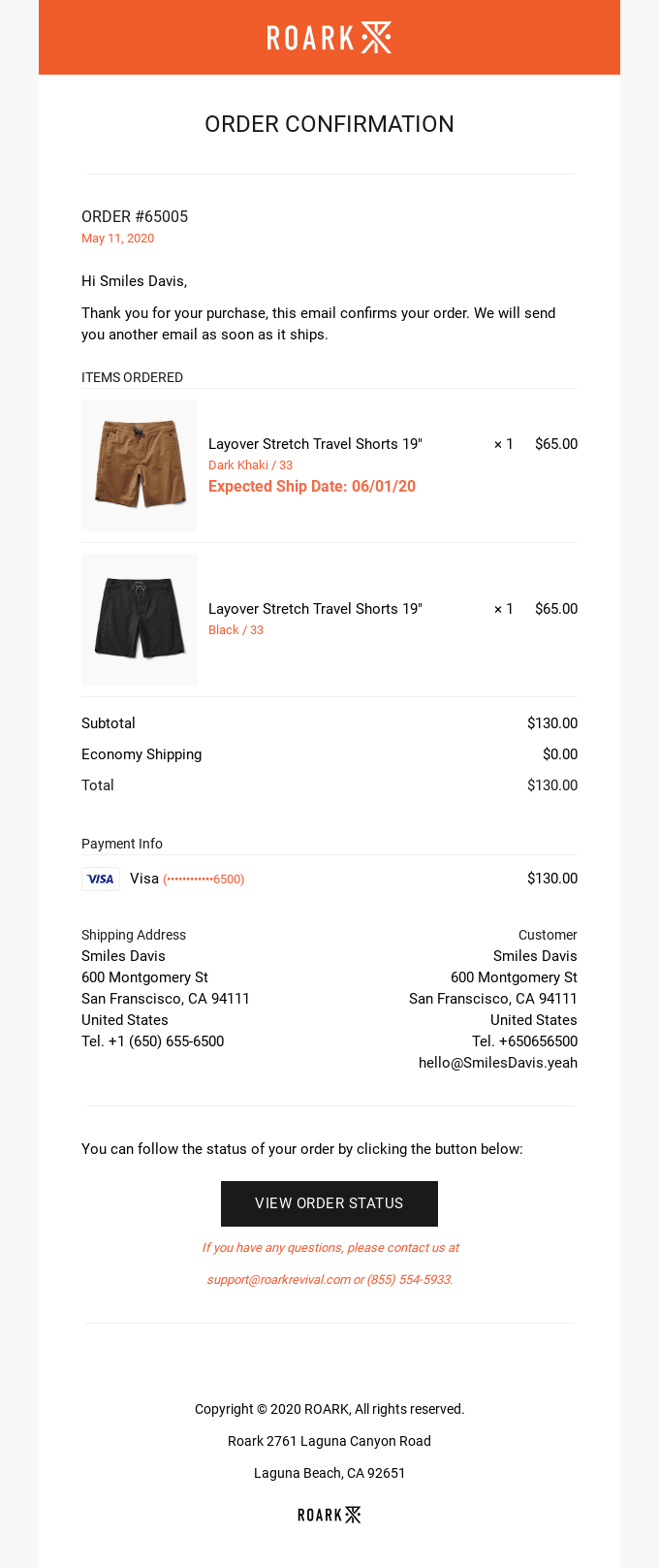
The moment a user opens a transactional email, they should be able to see what happened and what they should do next — no scrolling required. Place critical details like order numbers, reset buttons, or confirmation messages above the fold so they’re visible at a glance. This reduces user frustration and ensures that the most essential information is immediately accessible.
Use a short introductory line inside the email that names the event in your subject line. Like this example from Roark:
Subject line: Order #xxxxx confirmed
Make the Main CTA Easy to See and Tap
Transactional emails often contain a key action item — like “View order status” or “Reset your password.” The main CTA should stand out through contrast, size, and placement. Use a high-contrast button that visually draws the eye, label it with clear, action-oriented text, and ensure it’s large enough to tap comfortably on mobile screens. This improves usability and reduces support queries.
Use One Simple, Mobile-Friendly Layout
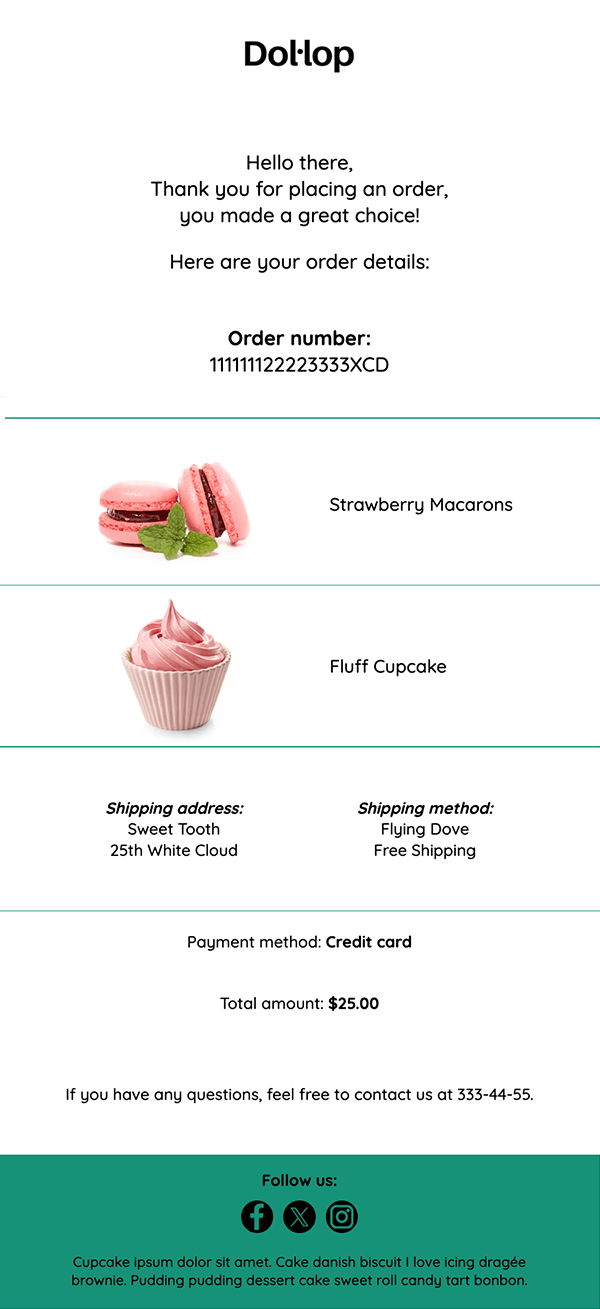
More than half of all emails are opened on mobile devices. A single-column layout ensures your email renders cleanly on any screen size, avoids horizontal scrolling, and makes content easier to scan. Keep font sizes readable without zooming, use generous white space, and stack content logically so users can move from the top of the email to the bottom without confusion.
Minimalism also helps focus attention on what matters. Avoid clutter, limit images to what’s necessary, and resist decorative elements that compete with essential information.
Start with a single-column layout like the one below:
2. Tone & Copy
Use Plain, Neutral Language
Transactional email copy should be straightforward, clear, and neutral. Users open these messages to get specific, expected information — not to be entertained or marketed to. This means:
-
Clear subject lines that describe the purpose (e.g., “Your Password Reset Request”).
-
Direct body text that explains what happened and what comes next.
-
Simple instructions without fluff or metaphors.
Avoid jokes, clever phrasing, or promotional language that could distract from the message’s intent. The focus should be on helping the user understand what the email is about immediately.
Using a consistent, calm voice helps users recognize these emails as trustworthy and familiar — something they don’t have to question or decipher.
Remove Humor, Hype, and Clever Phrasing
Transactional emails should prioritize clarity, trust, and accuracy over brand personality. While it’s important to maintain your brand’s voice, these emails aren’t the place for humor, puns, or imaginative storytelling.
Focus on keeping the core informational content neutral, precise, and easy to scan. Sections related to costs, access, or security should read like a reliable, trustworthy interface, giving users confidence in the message.
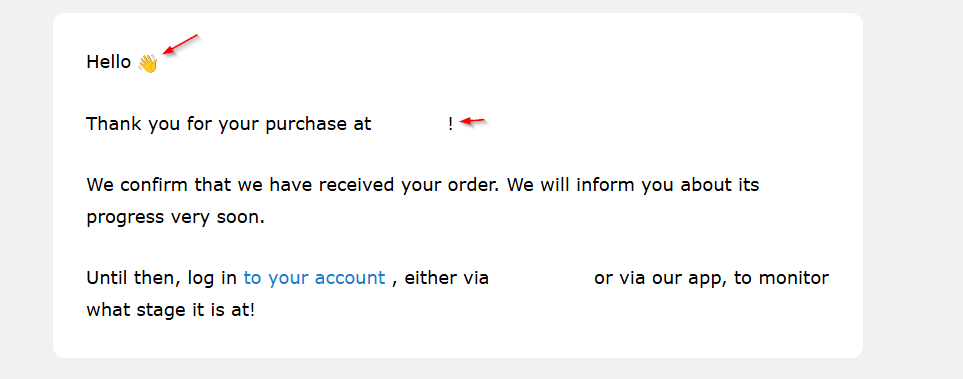
You can still add light brand flavor in low-risk areas—such as a greeting, a friendly closing, or a small emoji—but always ensure that the tone remains calm and informative. The personality should enhance the experience without distracting from the essential information.
Key Guidelines for Writing Transactional Emails:
-
Use direct, straightforward language to clearly communicate what happened, especially for sensitive actions like payments, password changes, or account updates.
-
Avoid jokes, vague phrasing, or playful copy that could confuse the message.
-
Maintain a calm and neutral tone rather than an excited or salesy one, reducing stress for the reader.
-
Write in simple, globally understandable English, and localize content for different audiences when appropriate.
-
Avoid idioms, slang, or culture-specific references in instructions.
-
Make it immediately clear what happened, what it means, and what the user should do next.
By keeping transactional emails clear, neutral, and purposeful, you build trust, improve comprehension, and ensure users can act confidently without hesitation.
3. Email Personalization
Personalization in transactional emails goes beyond just addressing the recipient by name. Its main goal is to reinforce trust, legitimacy, and user relevance, ensuring the email feels authentic and user-specific.
Use Personal Details to Confirm the Email is Legitimate
Including specific user information — such as the recipient’s name, order number, account ID, or recent activity — helps confirm that the email is genuine. This reduces the risk that users will mistake it for phishing or spam, which is particularly important for sensitive messages like payment confirmations, password resets, or security alerts. Highlighting these details also reassures the user that the action they performed was recognized and processed successfully.
Match Language, Currency, and Time to the User
Localization is a critical element of personalization. Transactional emails should reflect the recipient’s preferred language, regional settings, and even the time zone relevant to the user. For example:
-
Display prices in the user’s local currency.
-
Mention estimated delivery or event times adjusted to their time zone.
-
Use date formats and address conventions appropriate to the region.
These small but important adjustments enhance clarity and user confidence while making the email feel directly relevant to the individual.
By focusing on these personalization strategies, transactional emails become not only functional but also trust-building touchpoints in the user experience.
4. Deliverability
Even the most well-designed transactional email is ineffective if it never reaches the user’s inbox. Ensuring high deliverability involves technical setup, best practices, and ongoing monitoring.
Authenticate Your Sending Domain
Domain authentication protocols like SPF, DKIM, and DMARC verify that your email is legitimately sent from your domain. These settings prevent phishing, reduce the likelihood of being flagged as spam, and improve overall deliverability.
Send Emails from a Branded, Verified Address
Always use a recognizable sender name and a verified email address associated with your brand. This builds trust and ensures that users can identify the message as legitimate at a glance. Avoid using generic or no-reply addresses when possible, as these can reduce engagement and increase user skepticism.
Use Infrastructure Built for Transactional Email
Transactional emails should be sent through platforms or infrastructure specifically designed for real-time delivery. Unlike bulk marketing emails, transactional emails need high reliability and fast processing, particularly for time-sensitive actions like password resets or purchase confirmations.
Keep Transactional and Marketing Email Flows Separate
Mixing transactional and marketing emails can hurt deliverability. ISPs may penalize sending promotional content in emails intended for essential information, potentially routing them to spam folders. Maintain separate flows for transactional and marketing communications to ensure that critical messages are prioritized.
Choose Between SMTP and API
Modern transactional email systems offer multiple sending methods:
-
SMTP (Simple Mail Transfer Protocol): Reliable for traditional sending but may have slower processing or limited real-time tracking.
-
API (Application Programming Interface): Often faster and more secure, providing instant delivery, better analytics, and programmatic control over sending.
Choosing the right method depends on your technical setup, volume, and need for real-time updates.
Monitor Important Transactional Email Metrics
Regularly tracking key metrics is crucial to maintain high performance:
-
Delivery rate
-
Bounce rate
-
Open rate
-
Click-through rate (for CTAs or links)
-
Spam complaints
Monitoring these metrics helps identify technical issues, user engagement trends, or content problems early, allowing for quick optimization to maintain reliability and trust.
Read More: Email Deliverability: Avoiding The Spam Folder [2026]
5. User Engagement
Transactional emails may primarily deliver essential information, but they also present subtle opportunities to enhance user engagement and improve the overall customer experience. Done correctly, these emails can support users, provide additional value, and even drive business outcomes without compromising trust.
Add Help Center or FAQ Links
Including links to your help center, FAQs, or relevant support articles directly in transactional emails reduces friction for users who may have questions. For example, an order confirmation email can include links to shipping policies or return procedures, while a password reset email might link to account security tips.
This approach works well because it respects the moment. Here’s an example from Spotify:
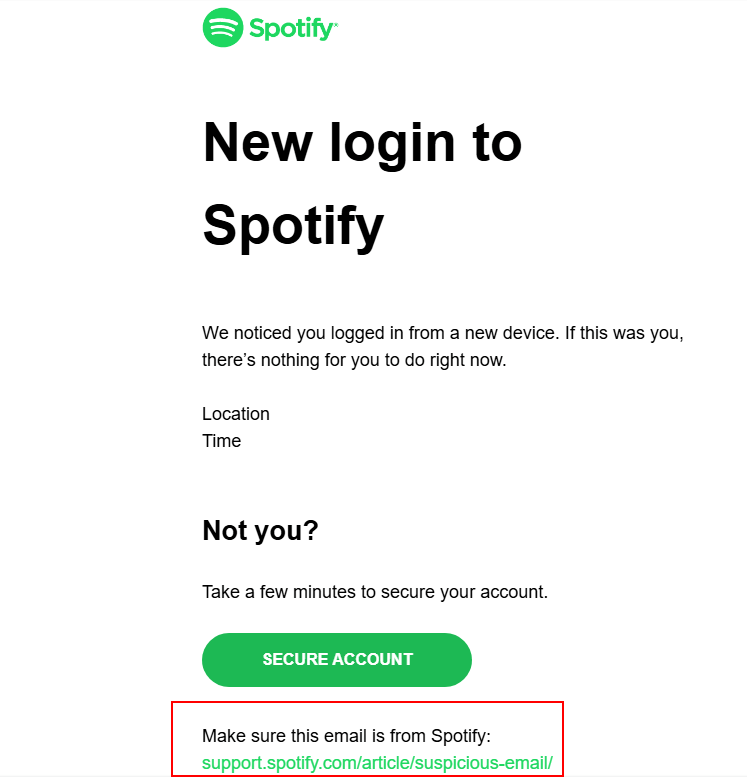
By providing this guidance proactively, you minimize support inquiries, improve user satisfaction, and demonstrate that your brand cares about helping users succeed. These links should be easy to find but not distract from the email’s main purpose.
Cross-Sell and Upsell Without Being Salesy
While transactional emails are not marketing emails, they offer a subtle opportunity for relevant cross-sells or upsells. The key is to keep the focus on utility:
-
Suggest complementary products or services that naturally fit the user’s recent action (e.g., a protective case with a smartphone order).
-
Present recommendations visually and clearly separated from the transactional content to avoid overwhelming the user.
-
Avoid aggressive sales language; the email should still feel primarily functional, not promotional.
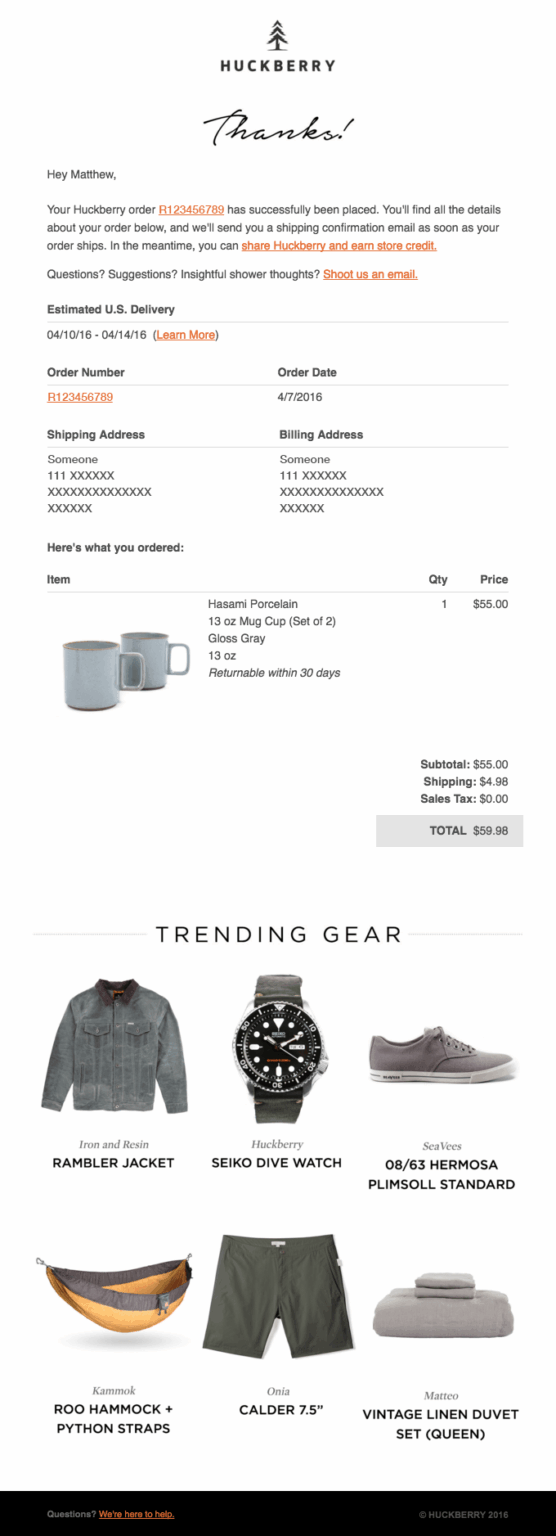
This example from Huckberry shows a cross-sell integrated within an order confirmation email. The email places the confirmation, order details, and main CTA at the top, ensuring the essential information is immediately visible. Additional product suggestions appear further down, allowing users to either skip them without distraction or explore them at their own pace. This approach keeps the transactional email functional while gently encouraging engagement.
When executed carefully, this strategy can enhance user experience while providing business value without damaging trust.
Run A/B Tests
Testing different elements of your transactional emails is crucial for continuous improvement. A/B tests can help determine the most effective:
-
Subject lines for better recognition and open rates
-
CTA placement, text, and color for faster action
-
Layout and design variations for easier readability
-
Messaging tone or personalization methods
Even small changes can lead to measurable improvements in engagement, click-through rates, and overall user satisfaction. Regularly analyzing these tests ensures that your transactional emails remain optimized and user-centric as expectations evolve.
Common Mistakes to Avoid
Even well-intentioned transactional emails can fail to deliver value if certain mistakes are made. These errors can lead to confusion, reduced engagement, support overload, and even deliverability issues. Understanding and avoiding them is critical to ensuring your emails are effective and trusted by users.
UX & Content Mistakes
1. Unclear or confusing messaging:
Transactional emails must clearly communicate the purpose of the message. Overly verbose text, jargon, or ambiguous instructions can frustrate users and lead to mistakes—like attempting to reset a password multiple times or calling support unnecessarily.
2. Overloading with unnecessary content:
Adding too many links, promotional messages, or secondary information can distract users from the primary action. Transactional emails are not marketing vehicles; their main goal is to help users complete a specific task.
3. Weak or missing CTAs:
The call-to-action (CTA) should be immediate, visible, and intuitive. Emails without a clear next step leave users unsure about what to do next, reducing engagement and increasing support requests.
Design & Accessibility Mistakes
1. Poor mobile optimization:
With most emails opened on mobile devices, a layout that doesn’t adapt to smaller screens creates frustration. Users may need to scroll excessively or zoom in to read content, which increases cognitive load and decreases usability.
2. Ignoring accessibility standards:
Failing to consider screen readers, color contrast, or font sizes excludes users with disabilities. Accessibility is no longer optional—emails must comply with basic accessibility guidelines to ensure everyone can read and act on the content.
3. Visual clutter or inconsistent layout:
Multiple columns, excessive images, or inconsistent branding can confuse users and distract from the email’s main purpose. Clean, simple, and predictable layouts are essential.
Deliverability & Compliance Mistakes
1. Sending from unverified domains or generic addresses:
Emails from “no-reply” or unverified domains are more likely to be flagged as spam or ignored. A branded, authenticated sender address builds trust and improves inbox placement.
2. Mixing marketing and transactional flows:
Incorporating promotional content into transactional emails can hurt deliverability. ISPs may mark messages as spam if promotional content is included, even in high-priority notifications.
3. Neglecting authentication protocols:
Failing to implement SPF, DKIM, or DMARC can result in emails being blocked, marked as spam, or appearing suspicious to recipients. Regularly checking these settings is critical for reliable delivery.
4. Non-compliance with regulations:
Transactional emails must adhere to local laws and regulations (e.g., CAN-SPAM, GDPR). While they often don’t require an unsubscribe link, certain information disclosure requirements must still be met. Ignoring this can lead to fines and reputational damage.
Operational Mistakes
1. Lack of monitoring and testing:
Transactional emails must be constantly monitored for delivery, engagement, and errors. Not testing emails for broken links, incorrect personalization, or rendering issues can result in a poor user experience.
2. Delays in delivery:
Slow delivery for time-sensitive emails (like password resets or payment confirmations) undermines trust. Users expect immediate responses, and delays can increase support tickets or churn.
3. Not handling edge cases:
Emails must account for unusual scenarios, such as failed payments, partial orders, or multiple account actions. Ignoring these situations can leave users confused or unsupported.
By proactively addressing these common pitfalls, organizations can maximize the reliability, usability, and effectiveness of their transactional emails. Avoiding these mistakes ensures that every email reinforces trust, guides users effectively, and supports business goals without creating friction.
FAQs
Transactional emails are essential tools for communication, but they often raise questions about best practices, compliance, and user experience. Here are answers to the most common concerns based on up-to-date guidance.
1. Can I include promotions in transactional emails?
Transactional emails should focus primarily on informational and functional content—confirming a purchase, resetting a password, or notifying a user about account activity. Including promotional content is generally discouraged because it can:
-
Distract from the email’s main purpose
-
Reduce user trust
-
Increase the risk of being flagged as spam
If promotions are included, they must be secondary, subtle, and relevant to the user’s recent action. For example, suggesting a protective case after a phone purchase is acceptable if it doesn’t overshadow the confirmation message.
2. Do transactional emails need an unsubscribe link?
Unlike marketing emails, transactional emails usually do not require an unsubscribe link, because they deliver critical information that users expect. For instance, a password reset email cannot be “unsubscribed” without disrupting the user’s experience.
However, it’s important to comply with local regulations (CAN-SPAM, GDPR, etc.) regarding information disclosure, privacy notices, and contact details. Users must still be able to manage notifications if they choose, but this should be separate from core transactional functionality.
3. How many transactional emails is “too many”?
The frequency of transactional emails should match user actions and expectations. Sending emails only in response to specific triggers—like order updates, login alerts, or account changes—is appropriate.
Excessive emails that aren’t directly tied to a user action can create fatigue and reduce trust. A good rule of thumb is: if the email isn’t essential to the user’s immediate task or confirmation, it probably doesn’t belong in the transactional flow.
4. Are transactional emails subject to marketing email regulations?
Transactional emails are typically treated differently from marketing emails under most laws, because their primary purpose is functional rather than promotional. That said:
-
Compliance with data protection and privacy regulations is still required (GDPR, CCPA, etc.)
-
Transparency about who is sending the email and the purpose of the message is necessary
-
Mixing marketing content into transactional emails may trigger marketing rules and affect deliverability
Keeping marketing and transactional flows separate ensures regulatory compliance and better inbox placement.
5. What if my transactional emails are going to spam?
If transactional emails end up in spam folders, consider the following steps:
-
Authenticate your domain: Implement SPF, DKIM, and DMARC records to prove the email is legitimate.
-
Use a verified, branded sending address: Avoid generic or “no-reply” addresses.
-
Keep flows separate: Ensure transactional emails aren’t mixed with marketing campaigns.
-
Check content and links: Avoid spammy language, misleading subject lines, or excessive links.
-
Monitor metrics: Track bounce rates, spam complaints, and deliverability performance to identify issues quickly.
Proactively addressing these factors ensures your emails reach users reliably and maintain trust.
Read More: How To Do Email Marketing In 2026