
Tracking performance is the backbone of effective email marketing. Metrics like open rate and click-through rate give you surface-level insights—but they don’t tell you what happens after someone clicks your email.
This is where UTM parameters become essential.
UTM parameters allow you to connect your email campaigns directly to your website analytics, giving you a clear picture of user behavior after the click. Instead of guessing whether your emails are driving traffic, conversions, or revenue, you can measure it with precision.
Without proper tracking, email traffic is often misclassified or grouped into vague categories like “direct” or “referral,” making it difficult to evaluate performance accurately.
By using UTM parameters consistently, marketers can move beyond assumptions and make data-driven decisions that improve campaign performance, audience targeting, and overall ROI.
What are UTM parameters
UTM parameters (short for Urchin Tracking Module) are small pieces of text added to the end of a URL to track where your website traffic is coming from.
A typical URL with UTM parameters looks like this:
https://yourwebsite.com/product
https://yourwebsite.com/product?utm_source=newsletter&utm_medium=email&utm_campaign=april_launch
Each parameter provides specific information about the click. When a user clicks this link, the data is automatically sent to analytics tools like Google Analytics, allowing you to identify:
- Which email or campaign drove the visit
- What channel the user came from
- Which specific link or content they clicked
UTM parameters act like tracking labels attached to your links. They tell your analytics platform exactly how a visitor arrived on your website and which marketing effort influenced that visit.
These parameters were originally developed by Urchin, a web analytics company later acquired by Google, and they remain a standard tracking method used across digital marketing today.
Importance of UTM in email marketing
UTM parameters play a critical role in making email marketing measurable, scalable, and optimized. Without them, you’re essentially operating without visibility into what’s working.
Accurate campaign tracking
UTMs ensure that every click from your email is correctly attributed. Instead of traffic being misclassified, you can clearly see which email, campaign, or segment generated the visit.
Measure real performance beyond clicks
Email metrics alone don’t show the full story. UTM tracking helps you understand what happens after the click—such as conversions, purchases, or time spent on your site.
Compare campaigns and channels
With consistent UTM tagging, you can compare the performance of different campaigns, newsletters, or even channels like email vs. social media. This enables smarter budget allocation and strategy decisions.
Using Teno Mail for campaigns!
Optimize future campaigns
By analyzing UTM data, you can identify which subject lines, CTAs, or email designs drive the best results. This allows you to refine your campaigns over time for better engagement and conversions.
Eliminate guesswork
Without UTMs, marketing decisions are often based on assumptions. UTM parameters turn that guesswork into actionable data, helping you understand exactly what is driving results and what isn’t.
Commonly used UTM parameters
UTM parameters are made up of specific tags that you add to your URLs. Each tag serves a unique purpose, and when used together, they give you a complete view of how your email campaigns perform.
Understanding these parameters properly is important—because incorrect or inconsistent usage can lead to messy, unreliable data.
utm_source:
The utm_source parameter identifies where the traffic is coming from.
In email marketing, this typically refers to the platform, tool, or list that sent the email. It answers the question: “Which source drove this visitor?”
Examples:
utm_source=newsletterutm_source=welcome-seriesutm_source=customer-listutm_source=crm
Best practice:
Keep this value consistent across campaigns. For example, if you use “newsletter” once, don’t switch to “email-newsletter” later, as it will split your data into multiple sources.
utm_medium:
The utm_medium parameter defines the marketing channel used to deliver the traffic.
For email campaigns, this is almost always set to:
utm_medium=email
This helps analytics tools group your traffic correctly under the email channel, making reporting more accurate and easier to interpret.
Examples:
utm_medium=emailutm_medium=drip-emailutm_medium=transactional-email
Best practice:
Stick with a standard value like email unless you have a very specific reason to differentiate.
utm_campaign:
The utm_campaign parameter tracks the specific campaign name.
This is one of the most important parameters because it allows you to group and analyze performance at the campaign level.
Examples:
utm_campaign=spring_saleutm_campaign=product_launch_mayutm_campaign=black_friday_2026utm_campaign=weekly_newsletter
Best practice:
Use clear, descriptive, and consistent naming conventions. Avoid vague names like “campaign1” or “test,” as they won’t be helpful later when analyzing performance.
utm_content:
The utm_content parameter is used to differentiate between multiple links within the same email.
If your email contains several CTAs or links pointing to the same page, this parameter helps you understand which one was clicked.
Examples:
utm_content=header_buttonutm_content=footer_linkutm_content=main_ctautm_content=image_banner
Use cases:
- Comparing button vs. text link performance
- Tracking different sections of an email
- Running A/B tests on CTAs
Best practice:
Use this parameter strategically when you need deeper insights, not for every single link unnecessarily.
utm_term:
The utm_term parameter is traditionally used for tracking keywords in paid search campaigns, but it can also be adapted for email marketing in specific cases.
In email campaigns, it can help you track audience segments or targeting criteria.
Examples:
utm_term=vip_customersutm_term=inactive_usersutm_term=trial_users
Best practice:
Use this parameter only when it adds meaningful segmentation data. It’s optional and not always required for email campaigns.
How to use UTM parameters
When working with email platforms, you have two main ways to implement UTM tracking: automatic tracking or manual URL building. Choosing the right approach depends on your workflow, level of control, and campaign complexity.
The easy way: automatic UTM tracking
The simplest way to use UTM parameters is by enabling automatic tracking within your email platform.
When this feature is turned on, the system automatically appends UTM parameters to every link in your email. This ensures:
- Consistent tracking across all campaigns
- No manual errors in tagging
- Faster campaign setup
Typically, automatic tracking will:
- Set
utm_medium=emailby default - Use your campaign name as
utm_campaign - Assign a predefined value for
utm_source
Why this is useful:
- Saves time, especially for frequent campaigns
- Reduces the risk of broken or inconsistent URLs
- Ideal for beginners or teams managing multiple emails
Limitation:
You have less control over how each individual link is tagged. If you need granular tracking (like distinguishing between multiple CTAs), automatic tracking alone may not be enough.
The custom way: build your own UTM URLs
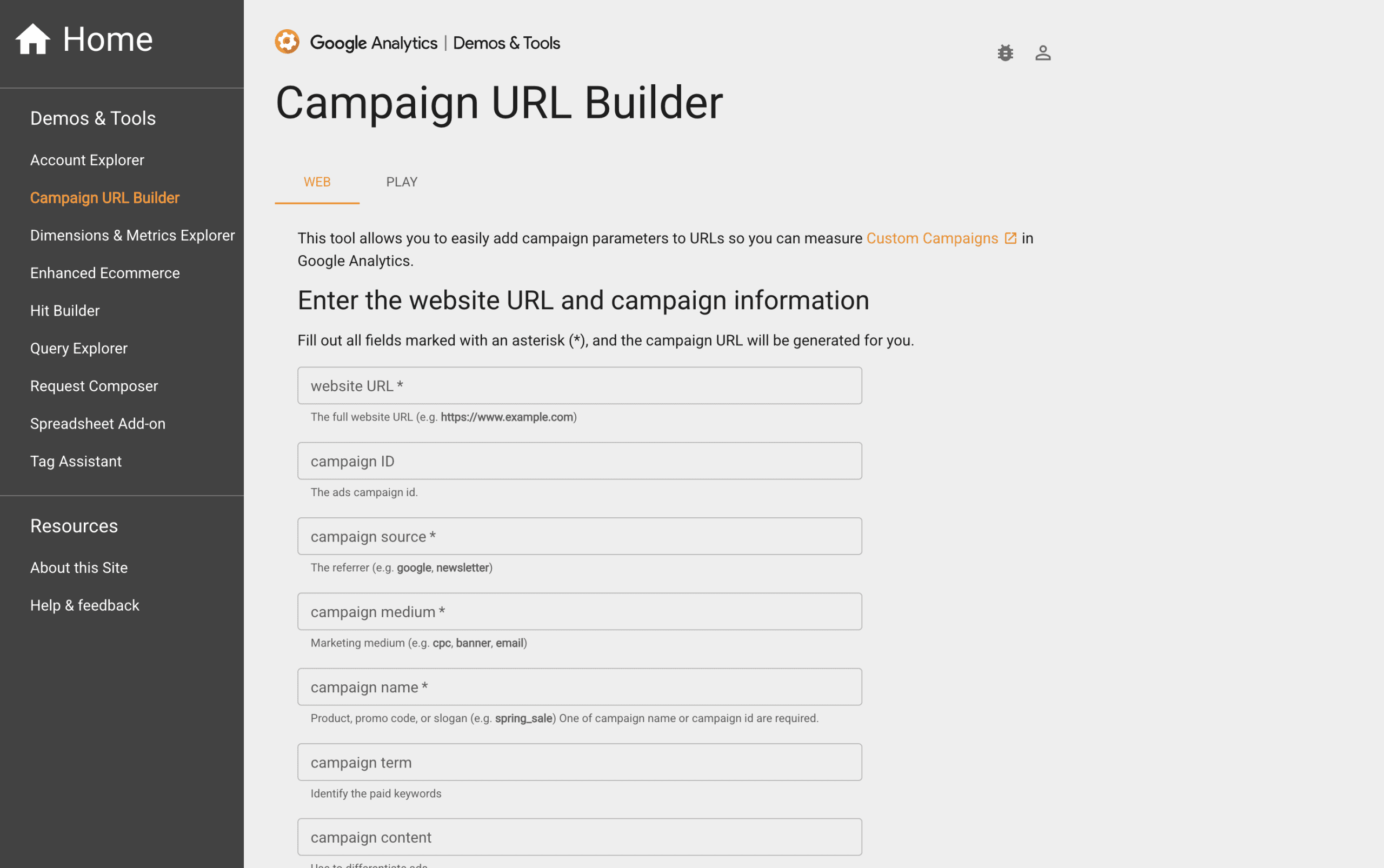
For more control and flexibility, you can manually create UTM-tagged URLs and use them in your emails.
This involves adding parameters directly to your links before inserting them into your email content.
Example:
https://example.com/pricing?utm_source=newsletter&utm_medium=email&utm_campaign=may_offer&utm_content=cta_button
Benefits of custom UTM URLs:
- Full control over every parameter
- Ability to track specific links and placements
- Better insights into user behavior within the email
When to use this approach:
- Running A/B tests
- Tracking multiple CTAs in a single email
- Segmenting audiences more precisely
- Analyzing detailed engagement patterns
Best practices:
- Use a consistent naming convention
- Avoid typos and formatting inconsistencies
- Keep URLs clean and readable
- Document your UTM structure for team-wide use
Things to keep in mind
Using UTM parameters effectively is not just about adding tags to your URLs—it’s about maintaining clean, consistent, and reliable data over time. Small mistakes can quickly lead to confusing reports and inaccurate insights. Here are the key principles you should follow:
Be consistent:
Consistency is the foundation of accurate tracking.
If you use different naming variations for the same source, medium, or campaign, your analytics tool will treat them as separate entries. For example:
utm_source=newsletterutm_source=Newsletterutm_source=email-newsletter
All three will appear as different sources, even though they represent the same thing.
What to do:
- Create a clear naming convention before you start
- Stick to lowercase formatting
- Document your UTM structure for your team
Consistency ensures your reports stay clean, organized, and easy to analyze.
Avoid spaces:
Spaces in URLs can break links or get converted into confusing characters like %20, making your data harder to read and manage.
Instead of this:
utm_campaign=summer sale
Use this:
utm_campaign=summer_saleutm_campaign=summer-sale
Best practice:
Use underscores (_) or hyphens (-) to separate words. This keeps your URLs clean, readable, and compatible across platforms.
Keep campaign names the same over time:
Changing campaign naming formats frequently can make long-term analysis difficult.
For example, if you run a weekly newsletter:
- Week 1:
utm_campaign=newsletter_may_week1 - Week 2:
utm_campaign=may_newsletter_wk2
These inconsistencies make it harder to group and compare campaign performance.
What to do instead:
- Use a standardized format like:
utm_campaign=newsletter_2026_05_week1 - Maintain the same structure across all campaigns
This allows you to track trends, compare results over time, and generate more meaningful insights.
Test your links first:
One of the most overlooked steps is testing UTM-tagged links before sending your email.
A small error—like a missing “?” or “&”—can break the link or prevent tracking from working properly.
Before launching your campaign:
- Click every link in your email
- Check that the page loads correctly
- Verify that UTM parameters appear in the URL
- Confirm tracking is recorded in your analytics tool
Testing ensures that your data is accurate and that users have a smooth experience.
Conclusion
UTM parameters are a simple yet powerful tool that transforms email marketing into a measurable, data-driven channel. Instead of relying only on basic metrics like opens and clicks, you gain full visibility into what happens after users interact with your emails.
By understanding how UTM parameters work, applying them correctly, and following best practices like consistent naming and proper testing, you can unlock deeper insights into your campaigns. This allows you to identify what drives engagement, optimize your messaging, and improve conversions over time.
Whether you choose automatic tracking for convenience or custom UTM URLs for greater control, the key is to use them strategically and consistently. When done right, UTM tracking doesn’t just measure performance—it helps you make smarter marketing decisions and achieve better results from every email you send.
Read More: How email marketing for automotive businesses drives leads and sales